
Tired of messy workflows and endless email threads? Content collaboration tools solve these issues by creating a single workspace where teams can create, edit, and manage content together. With 75% of creative collaboration now happening remotely, these platforms are essential for marketing teams to stay aligned and productive.
Key Takeaways:
- What they do: Help teams co-edit, manage feedback, and organize tasks in one place.
- Why they matter: Save 3–5 hours weekly by reducing delays and miscommunication.
- Features to look for:
- Real-time editing and feedback.
- Version control to track and undo changes.
- Integrations with tools like Slack, CRMs, and project managers.
- Automation to handle repetitive tasks.
- Top tools: Notion, Asana, StoryChief, ProofHub, Airtable, Google Workspace, Figma.
These tools help teams centralize resources, speed up workflows, and produce higher-quality content. Below, learn how to choose the right tool and implement best practices for maximum efficiency.
The 5 Best Online Collaboration Tools for Teams in 2025 (Ranked & Reviewed) | ClickUp
sbb-itb-7a4ada9
Key Features of Content Collaboration Tools
Effective collaboration tools come equipped with features designed to tackle the daily hurdles marketing teams face. By understanding these functionalities, you can pinpoint the platforms that will genuinely optimize your workflow and productivity.
Real-Time Collaboration and Feedback
Working on the same document at the same time is a game-changer for speeding up content creation. Features like live cursors show exactly where teammates are making changes, while inline commenting ties feedback directly to specific text or visuals, eliminating the chaos of vague email threads.
With suggestion modes, team members can propose edits without overwriting the original content, keeping the primary draft intact during reviews. Tools also include @mentions, which notify the right people when their input is required, cutting through irrelevant notifications.
For example, STANLEY Security reported an 80% boost in teamwork satisfaction after adopting centralized collaboration tools. As Kushal Dave, Marketing Manager at Multicollab, explains:
"As a member of the Multicollab team, I’ve seen firsthand how real-time collaboration transforms the content creation process. By enabling instant feedback and iterative editing, we have been able to empower teams to work seamlessly".
Version Control and Permissions
While real-time collaboration is great for productivity, version control ensures every edit is tracked and reversible. These tools log every change, showing who made edits and when, which eliminates the frustrating "Who did this?" moments. If something goes wrong, earlier versions can be restored in seconds.
Granular permissions add another layer of control, allowing you to assign roles like viewer, commenter, or editor, even for external collaborators. This is critical because 61% of data breaches involve collaboration tools with poor access controls. Proper permissions ensure external contributors can give feedback without accidentally disrupting your content structure.
Built-in approval workflows also help maintain quality by routing content through the right reviewers before it goes live. This safeguards brand consistency and minimizes the risk of mistakes slipping through.
Integrations and Automation
Top-tier collaboration tools seamlessly integrate with CRMs like Salesforce or HubSpot, messaging apps like Slack or Microsoft Teams, and project management platforms. These integrations reduce the need to constantly switch between tools, complementing features like real-time collaboration and version control to create a smoother workflow.
Workflow automation takes it a step further by handling repetitive tasks. For instance, content can automatically move from "Draft" to "Review" status, send alerts when approvals are needed, or trigger task handoffs between teams. This eliminates unnecessary delays and avoids the average 23-minute refocus time caused by context switching.
Modern platforms are also leveraging AI to summarize lengthy comment threads, pull actionable items from meetings, and even draft content briefs – saving hours of tedious admin work.
Additionally, an async-first design makes it easier for global teams to collaborate. Features like recorded video messages, threaded discussions, and timezone-aware scheduling ensure that teams across different regions can stay connected without needing everyone to be online at the same time. With 75% of creative collaboration now happening remotely, these tools are essential for keeping distributed teams in sync.
Top Content Collaboration Tools for Marketing Teams
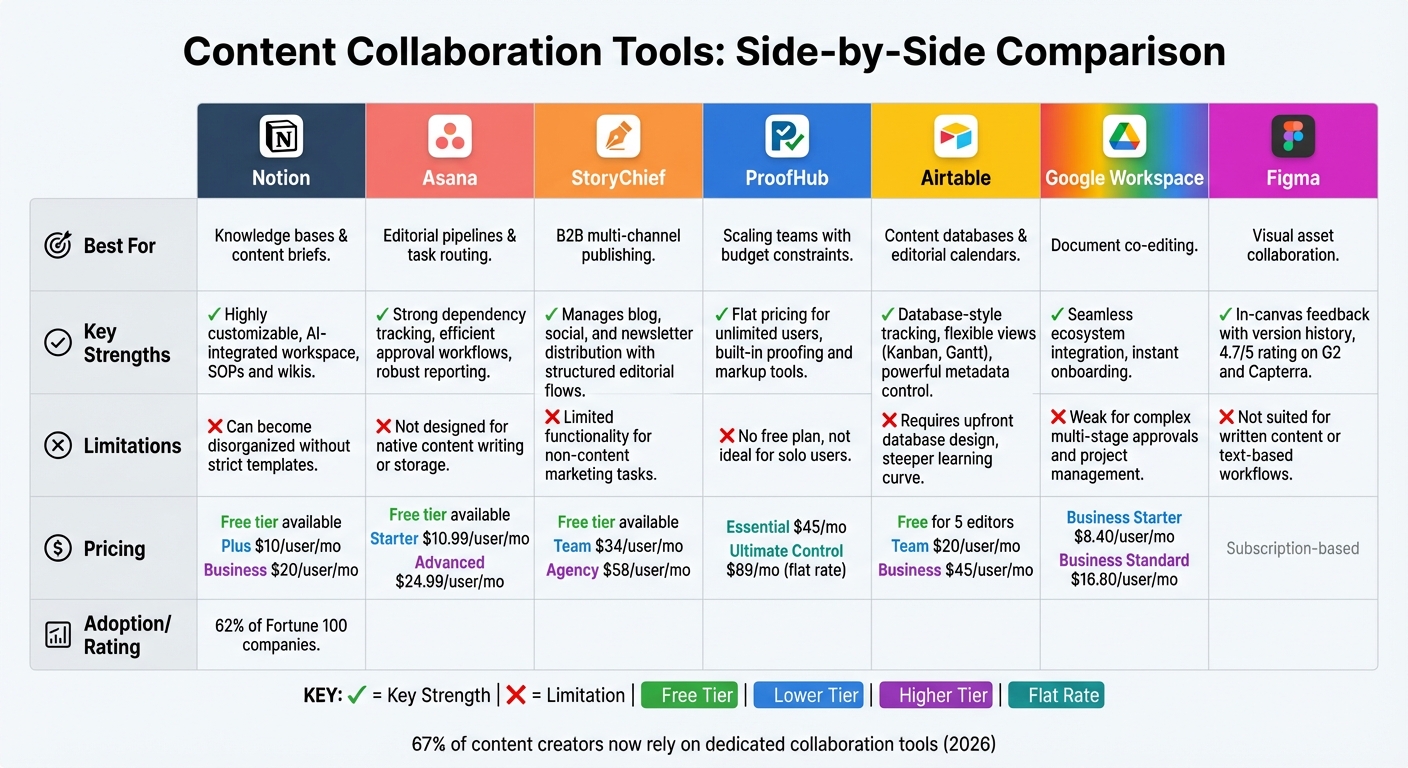
Content Collaboration Tools Comparison: Features, Pricing, and Best Use Cases
Overview of Selected Tools
In recent years, collaboration tools have evolved to meet the growing demands of marketing teams. By 2026, most teams have adopted a layered approach to their tech stack: a central knowledge hub, a task management system, and a quality control process. This shift is reflected in the numbers – 67% of content creators now rely on dedicated collaboration tools, a jump of 22 points since 2024.
Notion has become a favorite for knowledge management, used by 62% of Fortune 100 companies and more than half of Y Combinator startups. It brings together documents, task boards, and wikis in a customizable workspace. Asana, on the other hand, shines in managing editorial workflows with clear dependency tracking and formal approval stages, reducing the confusion of scattered Slack comments.
For B2B teams, StoryChief simplifies the entire content lifecycle, from creating briefs to publishing across multiple channels like CMS platforms, social media, and newsletters. Meanwhile, Airtable offers a robust content database, perfect for teams managing large inventories. However, it requires some upfront effort in database setup.
For those looking to avoid per-user pricing spikes, ProofHub is an attractive option with flat-rate pricing starting at $45/month. It includes built-in proofing and markup tools, making it budget-friendly for larger teams. Google Workspace continues to excel in co-editing, but it lacks the advanced workflow automation of tools like Asana.
Specialized tools are also making their mark. Surfer and Frase integrate SEO features directly into the content drafting process, ensuring content aligns with search engine requirements before editorial review. For visual collaboration, Figma leads the pack with real-time co-editing and in-canvas feedback, earning high ratings on platforms like G2 and Capterra.
Comparison of Key Tools
| Tool | Best Use Case | Key Strengths | Limitations | Pricing Model |
|---|---|---|---|---|
| Notion | Knowledge bases & content briefs | Highly customizable; AI-integrated workspace with SOPs and wikis | Can become disorganized without strict templates | Free tier; Plus at $10/user/mo; Business at $20/user/mo |
| Asana | Editorial pipelines & task routing | Strong dependency tracking; efficient approval workflows and robust reporting | Not designed for native content writing or storage | Free tier; Starter at $10.99/user/mo; Advanced at $24.99/user/mo |
| StoryChief | B2B multi-channel publishing | Manages blog, social, and newsletter distribution with structured editorial flows | Limited functionality for non-content marketing tasks | Free tier; Team starts at $34/user/mo; Agency starts at $58/user/mo |
| ProofHub | Scaling teams with budget constraints | Flat pricing for unlimited users; built-in proofing and markup tools | No free plan; not ideal for solo users | $45/mo (Essential) or $89/mo (Ultimate Control) |
| Airtable | Content databases & editorial calendars | Database-style tracking; flexible views (Kanban, Gantt); powerful metadata control | Requires upfront database design; steeper learning curve | Free for 5 editors; Team at $20/user/mo; Business at $45/user/mo |
| Google Workspace | Document co-editing | Seamless ecosystem integration; instant onboarding | Weak for complex multi-stage approvals and project management | Business Starter at $8.40/user/mo; Business Standard at $16.80/user/mo |
| Figma | Visual asset collaboration | In-canvas feedback with version history | Not suited for written content or text-based workflows | Subscription-based; 4.7/5 rating on G2 and Capterra |
This comparison highlights how each tool serves specific needs, giving marketing teams the flexibility to tailor their workflows while addressing unique challenges.
Best Practices for Implementing Collaboration Tools
Define Roles and Workflows
One of the most common pitfalls for marketing teams is adopting a collaboration tool without first setting clear responsibilities. To avoid this, every piece of content should follow a structured process: Strategy → Brief → Draft → Optimization → Review → Approval → Publish. Assigning specific roles for each stage ensures smoother execution. For example:
- Author: Creates the initial draft.
- Structural Editor: Focuses on content logic and flow.
- Copy Editor: Refines grammar and ensures brand consistency.
- SEO Reviewer: Optimizes for search engines.
- Approver: Provides the final sign-off.
Use status tags like "Needs Legal Review" or "Optimization Complete" to signal progress and prevent premature transitions.
It’s also important to separate feedback rounds to avoid conflicting input. For instance, start with structural reviews, then move to copy editing, and finally conduct SEO checks. Delays caused by waiting for feedback can lead to major bottlenecks, so set firm review windows of 24–48 hours. To keep things moving, adopt a "silence equals approval" rule for non-critical stakeholders.
A "Definition of Done" checklist can further clarify expectations. For example, ensure tasks like adding an H1 header, internal links, and a call-to-action (CTA) are completed before moving to the next stage. With these processes in place, teams can work more effectively and make the most of centralized tools, as discussed in the next section.
Centralize Assets and Feedback
Scattered feedback – whether through email, Slack, or Google Docs – leads to confusion and inefficiency. Centralizing assets into a single platform ensures everyone works from the same, up-to-date version, reducing errors and saving time. This approach not only minimizes the chaos of version control but also speeds up execution.
Move all feedback into the collaboration tool’s inline commenting system to keep an organized audit trail. Inline comments provide context, making revisions faster and communication clearer than relying on separate feedback logs. Additionally, tools like instant messaging can cut email volume by about 28%, streamlining communication.
Document decisions directly within tasks or documents rather than in meeting notes or chat threads. Dedicated folders or workspaces for specific projects can help manage tasks and deadlines more efficiently. Real-time transparency allows stakeholders to track progress instantly, reducing the need for constant status meetings and fostering accountability.
Centralized asset management naturally lays the groundwork for implementing templates and automation, which further enhance efficiency.
Use Templates and Automation
Templates and automation are key to simplifying workflows and maintaining consistency. Develop reusable templates for different content formats – such as how-to guides, listicles, or case studies – to standardize processes and reduce repetitive work. Use request forms that capture essential information upfront, like keywords, audience, and tone, to avoid rework or missing details.
Automation can also eliminate tedious follow-ups. Set up automated alerts for deadlines, approvals, and status changes to keep everyone on track. These tools not only speed up production but also help maintain quality. For instance, a McKinsey survey found that 40% of professionals using generative AI reported 30–50% faster work cycles.
Quality gates, powered by automation, can enforce "Definition of Done" checklists. For example, content shouldn’t advance to approval until it meets specific SEO or readability benchmarks. By connecting your approval system to your CMS and social media platforms, "Final Approval" can trigger immediate publication and cross-platform sharing. Start small by automating one content type, refining the process, and then scaling it to other formats.
These strategies not only save time but also ensure a more consistent and effective content creation workflow.
How Upward Engine Uses Content Collaboration Tools

Upward Engine showcases how content collaboration tools can simplify workflows and enhance productivity across teams.
Streamlining Content Creation and Distribution
By using content collaboration tools, Upward Engine ensures its SEO specialists, writers, and designers can work together seamlessly, cutting down on delays and maintaining high-quality output. These tools help bypass common roadblocks during content reviews, enabling projects to stay on schedule.
The team uses Notion to centralize key resources like strategy documents, keyword research, and search intent analysis. This setup ensures smooth transitions between phases like strategy development, drafting, editing, and final approval. Everyone has quick access to the information they need – no more digging through endless email threads or scattered files.
For clients managing content across multiple channels, Upward Engine leverages automated workflows with platforms like Asana and StoryChief. These tools map out every step, from the initial brief to publication, ensuring nothing falls through the cracks.
Improving Team Productivity and Client Results
Centralizing resources and feedback within these tools doesn’t just streamline distribution – it also boosts team productivity. Real-time tracking minimizes the need for frequent status meetings or email updates. This transparency allows account managers to easily share campaign updates with clients, building trust without adding extra admin work.
Upward Engine also relies on structured workflows to deliver consistent results. Whether it’s content for local SEO, large-scale advertising campaigns, or tailored web design projects, their processes ensure every piece meets quality standards before reaching the client. This system not only speeds up production but also allows the team to scale efficiently across multiple client accounts without losing focus on quality or outcomes.
Conclusion
Content collaboration tools have become an essential part of modern marketing workflows. Marketing teams often lose valuable hours each week due to delays and rework caused by waiting for feedback. That’s time that could be better spent on creating content, refining strategies, or engaging with their audience.
The right tools can eliminate version confusion, centralize feedback, and speed up production cycles by 2–3x. Features like real-time co-editing and automated task tracking allow teams to focus on their creative work rather than getting bogged down in logistical headaches.
To truly benefit, though, proper implementation is key. Defining roles clearly, automating repetitive tasks, and avoiding notification overload are just a few best practices that ensure teams can make the most of these tools.
With the collaboration software market expected to hit $15.05 billion by 2024, it’s clear that this shift is here to stay. And with 75% of creative collaboration now happening remotely, these tools do more than boost efficiency – they help maintain alignment and quality across distributed teams, a recurring theme throughout this guide.
Whether you’re managing a small in-house team or juggling multiple client accounts, the fundamentals remain the same: centralize your resources, streamline workflows, and establish clear feedback processes. Teams that embrace these principles – and the tools that support them – will leave behind the inefficiencies of scattered files and endless email chains, gaining a competitive edge in the fast-paced world of marketing.
FAQs
Which tool should we pick first for our team?
When choosing your first tool, it all comes down to your team’s priorities. For real-time communication, platforms like Slack or Microsoft Teams work wonders, especially for remote or hybrid teams. If your team is diving into content creation, options like Notion or ClickUp can simplify workflows and boost efficiency. The key is to pick tools that align with your immediate goals – whether it’s seamless communication, managing projects, or collaborating on content – to make the transition as smooth as possible.
How can we safely set permissions for freelancers and clients?
When managing permissions, it’s crucial to use platforms that offer role-based access controls. This ensures freelancers and clients only have access to the parts of a project that are relevant to them.
Start by clearly defining access levels during onboarding. Specify who is allowed to view, edit, or comment on specific areas of the project. Make it a habit to review and update permissions regularly, especially when roles or project requirements evolve.
Finally, make sure to communicate expectations around confidentiality and data security. This step helps protect sensitive information while maintaining trust between all parties involved.
What’s the fastest way to roll out templates and automation without disrupting work?
The quickest way to bring templates and automation into your processes is by leveraging automated content workflow tools. These tools combine tasks like brainstorming, writing, editing, and publishing into one streamlined system, cutting down on repetitive manual work.
To make the transition easier, start by setting up templates and defining automation rules. Introduce these gradually, beginning with less critical workflows. Providing proper training for your team ensures minimal disruptions while enhancing overall efficiency.