

Voice and text searches serve different purposes, reflecting distinct user behaviors and expectations. Here’s the key takeaway:
- Text searches are concise and keyword-focused, encouraging users to explore multiple results.
- Voice searches are conversational, longer, and often urgent, aiming for direct, single answers.
Key Stats:
- Voice queries are 3.7x more likely to include question words like "who", "what", or "how."
- On average, voice queries are 4.2 words longer than text searches.
- Voice search users are 3.2x more likely to make a purchase within 24 hours.
- 58% of voice searches focus on local information.
Quick Comparison:
| Aspect | Text Search | Voice Search |
|---|---|---|
| Query Style | Short keywords | Full sentences, conversational |
| Intent | Research and comparison | Quick answers, immediate action |
| Length | Brief | 3-5x longer |
| Focus | Broad exploration | Specific, contextual needs |
| Conversion Likelihood | Lower | Higher |
Bottom Line: Voice searches demand precise, context-aware answers, while text searches support broader exploration. Businesses need tailored strategies for each to stay visible in search results. This is especially critical for local rankings and Google Maps visibility.
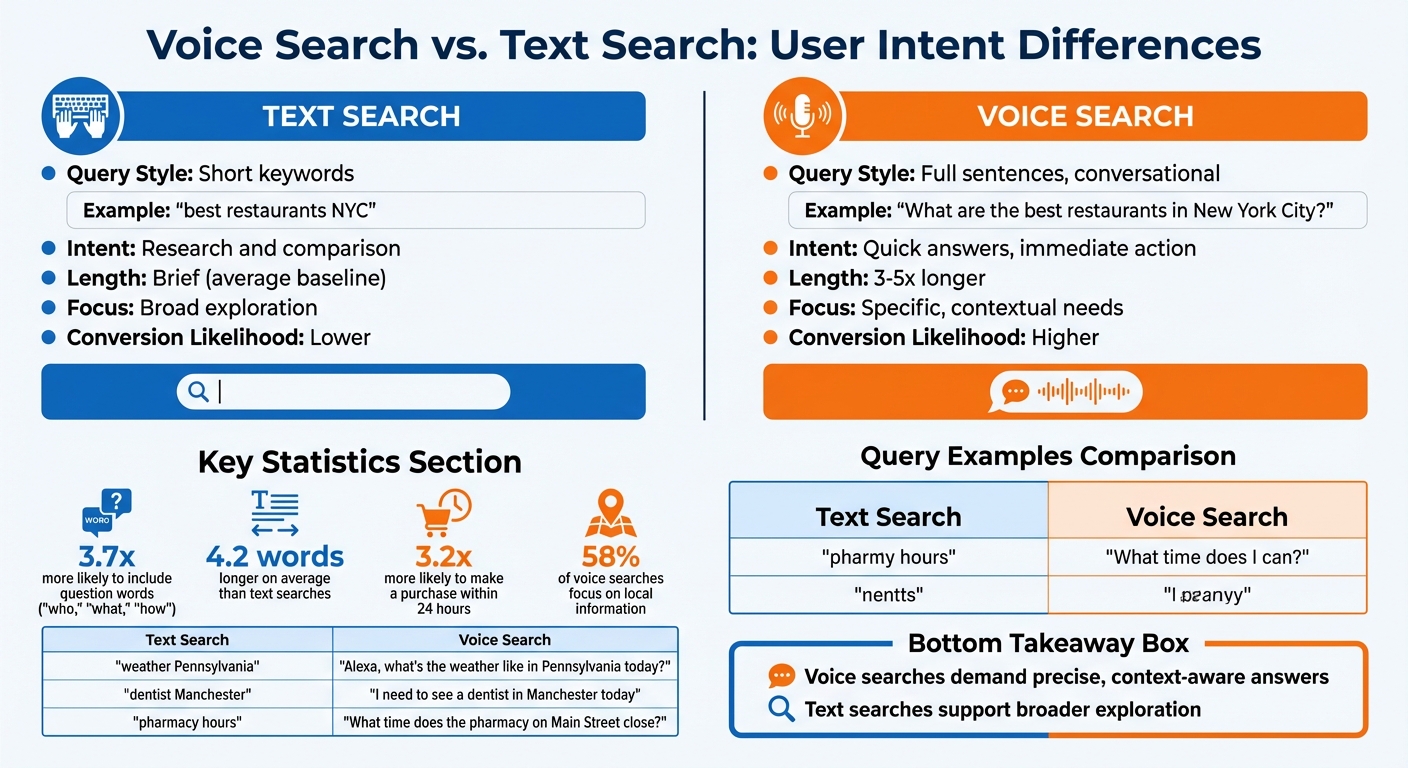
Voice Search vs Text Search: Key Differences and Statistics
Voice Search Optimization for Beginners: What You Need to Know #voicesearchoptimization
sbb-itb-7a4ada9
How Query Structure Differs
Search phrasing changes depending on how users input their queries: typed searches lean on shorthand, while voice searches reflect natural conversational patterns. Text searches are all about brevity, using keyword phrases to save time. Voice searches, on the other hand, mimic real conversations, often including full sentences, personal pronouns, and extra context. Let’s break it down further.
Text Search: Short Keyword Phrases
When typing, people focus on getting to the point. A typical text query might look like "best restaurants NYC" or "weather Pennsylvania." It’s quick and to the point because users expect to sift through multiple results themselves. The emphasis is on speed, not precision.
Search engines have adapted to this shorthand style, so you don’t need to type out, "What are the best restaurants in New York City?" Instead, "best restaurants NYC" gets you the same results faster. These searches tend to rely on head terms – short, broad keywords designed to generate a wide range of results.
Voice Search: Full Conversational Sentences
When using voice assistants like Siri, Alexa, or Google Assistant, people naturally phrase their queries as if they’re talking to another person. Instead of saying "dentist Manchester," they might ask, "I have a terrible toothache and need to see a dentist in Manchester today." These queries often include urgency, location, and context – details rarely found in typed searches.
Tanatswa Chingwe, an SEO writer, explains it well:
"People speak naturally. Instead of typing ‘weather Pennsylvania,’ you’d say, ‘Alexa, what’s the weather like in Pennsylvania today?’"
Voice queries are typically 3 to 5 times longer than text searches, with about 60% of them being question-based. They also feature action verbs like "show", "find", "get," and situational phrases such as "near me" or "on my way home." In fact, navigational voice queries are 2.3 times more likely to include these action words than text searches.
This conversational style reflects how users expect voice assistants to provide direct and immediate answers.
Query Examples Comparison Table
Here’s a side-by-side look at how text and voice queries differ:
| Topic | Text Search | Voice Search |
|---|---|---|
| Local Dining | "best restaurants NYC" | "What are the best restaurants in New York City?" |
| Weather | "weather Pennsylvania" | "Alexa, what’s the weather like in Pennsylvania today?" |
| Local Service | "dentist Manchester" | "I have a terrible toothache and need to see a dentist in Manchester today." |
| Shopping | "organic essential oil sleep" | "Where can I find organic essential oils that help with sleep?" |
| Business Info | "pharmacy hours" | "What time does the pharmacy on Main Street close?" |
| How-to | "pancake recipe" | "How do you make pancakes?" |
Voice queries stand out because they include complete sentences, question words, and extra details that are often skipped in text searches. This isn’t just a difference in style – it’s a reflection of how people expect voice assistants to respond: with direct, conversational answers tailored to the context of their question.
How User Intent Varies
When it comes to search behavior, the way users interact with text versus voice queries reveals a lot about their intent. The purpose behind a search shifts significantly depending on whether someone is typing or speaking. Text searches often indicate exploration – users are browsing, comparing, and open to reviewing multiple results. In contrast, voice searches are all about resolution. People want a quick, definitive answer or action, not a list of possibilities.
Mandeep Wraich, a Digital Marketing Analyst, sums it up perfectly:
"Typed searches invite exploration. Spoken searches expect resolution."
Text Search: General Exploration
When users type their queries, they’re typically in research mode. For instance, someone searching for "running shoes" might be checking out styles, comparing prices, or reading reviews. They’re gathering information, not necessarily ready to make a purchase. This exploratory behavior gives businesses the opportunity to interpret user needs, but it also results in lower immediate conversion rates.
Text searches often use shorthand keywords, leaving room for interpretation. A query like "pharmacy hours" could mean the user is looking for general hours or specific holiday schedules. Search engines respond by offering a variety of options – links, maps, and snippets – so users can decide what best fits their needs. Voice queries, however, skip the exploration phase and aim for immediate answers.
Voice Search: Immediate Specific Needs
Voice queries are designed to deliver a single, definitive answer. For example, when someone asks, "What time does the pharmacy on Main Street close?", they’re not interested in browsing options – they want to know if they can get there before it shuts.
This type of search is often tied to real-time actions. In fact, 58% of consumers use voice search to find local business information, and voice searches are three times more likely to be locally focused compared to text searches. These queries often carry a sense of urgency or emotional context, such as "open late" or "on my way home."
Mandeep Wraich highlights the difference well:
"Voice search is a prediction engine, not a search engine."
Voice assistants function more like decision-makers, aiming to provide certainty and simplicity. When users ask for the "best" option, assistants often provide a single recommendation instead of a list. Interestingly, only 62% of voice queries receive a direct answer; the rest may result in suggestions or no actionable response due to ambiguity.
Long-Tail Keywords and Voice Search
Voice search has shifted the focus from short, generic keywords to long-tail keywords – those conversational, highly specific phrases that mimic natural speech. Spoken queries tend to be more detailed, averaging 4.2 words longer than typed ones, with the average voice query totaling 11 words. This means businesses need to optimize for these more nuanced phrases.
Long-tail keywords reveal intent that short keywords often miss. For example, a text search for "dentist" is vague, while a voice query like "I have a terrible toothache and need to see a dentist in Manchester today" provides urgency, location, and the specific service required. Gombos Atila Robert, CEO of Jasmine Business Directory, explains:
"The specificity [of voice] reveals urgency and context that traditional keywords miss entirely."
Voice queries are also 3.7 times more likely to include question words like "who", "what", "where", "when", "why", and "how". This makes voice search naturally suited for long-tail patterns. Over 40% of voice queries don’t have a direct equivalent in traditional keyword tools because they’re too detailed or context-specific. For businesses, targeting these conversational phrases isn’t just helpful – it’s critical for capturing voice search traffic.
Optimizing Content for Each Search Type
Adapting content to fit the distinct needs of text and voice searches is essential. Each type calls for a unique approach, and what works for one might not succeed for the other. Here’s how to tailor your strategies for both.
Text Search: In-Depth Content
Text search thrives on detailed, long-form content that provides a complete exploration of a topic. Users often approach text search with an investigative mindset, looking for resources that allow them to dive deep into a subject.
Formats like blog posts, landing pages, and resource guides are particularly effective here. To make your content user-friendly, structure it with clear headings, subheadings, and internal links. This way, readers can quickly locate the specific information they need without feeling overwhelmed.
Voice Search: Clear and Direct Answers
Voice search operates differently. Instead of sifting through options, users want a single, concise answer. In fact, the average voice search result is just 29 words long.
To cater to this, start your content with a short, 40–60 word summary that directly addresses the query. FAQ sections are especially useful for voice optimization. Use natural, conversational question headings like "What time does the store close?" to align with how people phrase their voice queries.
Additionally, featured snippets are a major player in voice search. About 40.7% of voice search answers come from featured snippets, and over 80% of Google Assistant responses are sourced from pages ranking in the top three search results.
Structured Data and Schema Markup
Structured data acts as a bridge between your content and search engines, helping search algorithms interpret your page’s information accurately. Using schema markup can significantly boost your chances of appearing in voice search results – pages with schema markup are 33% more likely to be featured.
Different schema types serve specific purposes:
- FAQPage schema: Perfect for question-based voice queries.
- HowTo schema: Ideal for instructional searches like "How do I bake a cake?"
- LocalBusiness schema: A must for "near me" searches, offering details like hours, location, and contact info.
- Speakable schema: Highlights sections (2–3 sentences or 20–30 seconds of content) optimized for text-to-speech playback.
- Product schema: Useful for voice commerce and price comparisons.
| Schema Type | Voice Search Impact | Use Case |
|---|---|---|
| FAQPage | High | Matches question-based voice queries |
| HowTo | High | Supports "How do I…" searches |
| LocalBusiness | Critical | Key for local and "near me" searches |
| Speakable | Direct | Optimizes sections for text-to-speech |
| Product | Moderate | Assists with pricing and product queries |
Fast load times are also critical for voice search. Pages optimized for voice search load 52% faster on average, making mobile-first design and speed optimization a priority.
Device and Platform Differences
The way people search online isn’t just influenced by what they’re looking for – it also depends heavily on the device they’re using. Whether it’s a desktop, smartphone, or smart speaker, the device shapes how searches are conducted and what users expect to find. For instance, text searches on desktops and mobile browsers often involve deeper exploration, while voice searches on smartphones or smart speakers are more about getting quick, no-fuss answers. As users shift from desktops to voice-enabled devices, their demand for immediacy increases, requiring tailored approaches to meet these unique needs.
Text Search: Desktop and Mobile Browsers
Typing a query into a browser typically signals a desire to explore. Both desktop and mobile browsers cater to this by presenting a variety of options – headlines, snippets, and images – designed to encourage deeper research and comparison.
Voice Search: Mobile and Smart Speakers
Voice searches play by a different set of rules. Whether it’s through a smartphone or a smart speaker, users expect concise, straightforward answers rather than a list of possibilities. This is because voice searches often happen during multitasking – like driving, cooking, or walking – where hands-free convenience is key.
The stats tell the story. Mobile assistants deliver answers averaging 43 words, while smart speakers keep it even shorter at about 41.4 words. This brevity matches the hands-free, quick-response nature of these devices. However, not all voice queries get a direct answer. In-car systems, for example, have the highest rates of refusal or deflection, often due to safety concerns. Overall, only 62% of voice searches receive a spoken response, while 24% lead to suggestions, and 14% result in no usable answer at all.
Adjusting Your SEO Strategy
The rise of voice search has introduced clear distinctions between how people interact with voice versus text-based queries. With over 1 billion voice searches happening every month and 58.6% of Americans having tried voice search at least once, it’s clear that optimizing for voice is no longer optional. Recognizing these differences helps shape the necessary adjustments to your SEO strategy, ensuring it stays relevant in this evolving landscape.
Rethinking Keyword Research
Traditional keyword research often revolves around short, clipped phrases like "weather Pennsylvania" or "pizza delivery." Voice search, however, flips this approach on its head. Users tend to ask full, conversational questions such as, "What’s the weather like in Pennsylvania today?" To align with this shift:
- Reframe your keywords into natural, question-based formats. For instance, target "What are the benefits of meditation?" instead of "meditation benefits."
- Focus on long-tail keywords that reflect specific intent, including time, location, or action.
- Keep answers concise – ideally under 50–60 words – to improve your chances of appearing in featured snippets.
- Use schema markup like FAQPage, HowTo, and LocalBusiness to help search engines pinpoint content suitable for voice responses.
These changes not only cater to voice queries but also enhance your chances of capturing local and featured search results.
Focusing on Local SEO for Voice
Voice search is heavily tied to local intent. In fact, 76% of voice searches are local, and mobile voice queries are three times more likely to focus on local needs than text searches. When someone asks, "Where’s the nearest coffee shop?" they’re expecting immediate, actionable results. Here’s how to meet these expectations:
- Keep your Google Business Profile up to date with accurate categories, descriptions, and operating hours.
- Ensure your business’s Name, Address, and Phone number (NAP) are consistent across all platforms, including directories and social media.
- Develop hyper-local content that reflects how people naturally speak. For example, instead of only targeting "best Italian food in Chicago", address queries like "Where’s the best Italian restaurant near Millennium Park?" or "Where can I get authentic pasta in the Loop right now?"
This localized approach ensures your business is visible for the kinds of voice queries users are making in their immediate surroundings.
Establishing Authority for Voice Search
Voice assistants prioritize delivering clear and authoritative answers. To stand out, your content needs to be structured and optimized for these criteria:
- Use structured data to help search engines extract accurate and concise responses, even if your page isn’t ranked at the top.
- Organize content with headings that mirror how users phrase their questions.
- Highlight positive reviews – higher ratings often influence voice search recommendations.
- Ensure your website is mobile-friendly and loads quickly (ideally within 1.5 to 3 seconds) to meet the fast-paced needs of voice users.
As Tanatswa Chingwe aptly states:
"Voice search isn’t a tech trend anymore. It’s a real part of how people live."
While voice search often results in a zero-click experience – where users get answers without visiting your site – this doesn’t diminish its value. By positioning your business as a trusted source for voice answers, you build credibility and brand recognition, even if users don’t click through.
Conclusion
Voice search and text search function in fundamentally different ways. Voice search leans on conversational queries to provide direct answers, while text search typically uses concise keywords for broader exploration. For instance, a text query like "pizza London" might indicate someone is researching options, whereas a voice query such as "Where is the best pizza near me?" signals an immediate intent to act. On average, voice queries are 4.2 words longer, 3.7 times more likely to include question words, and users are 3.2 times more likely to make a purchase within 24 hours compared to text searches. These differences highlight the need for distinct SEO strategies to address both search methods effectively.
Gombos Atila Robert, CEO of Jasmine Business Directory, underscores this point:
"When someone asks their smart speaker ‘Where’s the best pizza near me?’ versus typing ‘pizza restaurant reviews,’ they’re revealing different layers of intent that go far beyond the surface-level keywords".
Voice assistants focus on delivering a single, clear answer rather than presenting a list of options. In fact, over 40% of voice queries are so specific or contextual that they lack direct equivalents in traditional keyword tools.
This shift calls for precise SEO tactics. While text search rewards high rankings among several results, voice search is all about securing the top – and often only – spot. To stay competitive, businesses must optimize for natural language, structured data, local accuracy, and content that prioritizes direct answers. By adapting to these distinct search behaviors, brands can maintain visibility across both voice and text platforms.
For expert help in navigating these evolving search trends, consider partnering with Upward Engine (https://upwardengine.com), a digital marketing agency dedicated to helping businesses succeed in today’s fast-changing digital landscape.
FAQs
How can I find voice-search keywords?
To discover keywords for voice search, prioritize natural language, focusing on how people speak rather than type. Voice queries often take the form of questions or longer, conversational phrases. For example, instead of typing "best pizza NYC", a voice search might sound like, "Where can I find the best pizza in New York City?"
Pay attention to question-based queries like "how", "what", "where", and "why", as they dominate voice search patterns. Additionally, look for local intent in searches, such as "near me" phrases, which are common in spoken queries.
To refine your keyword strategy, leverage tools that highlight long-tail keywords and frequently asked questions. These tools can help you identify the exact phrases people use when speaking, giving you a better chance to align your content with voice search behavior.
What schema should I add for voice SEO?
To boost your voice SEO, consider using schema markup tailored for local business, voice search, and FAQ content. Since voice searches tend to mimic natural language and often focus on location-based queries, these schemas help search engines interpret your content more effectively and connect it with relevant user questions.
How do I track voice search results?
Tracking voice search results involves examining the queries and responses processed by voice-enabled devices or virtual assistants. To do this effectively, you can use analytics tools or specialized software that logs and reviews voice interactions. These tools help you understand what users are asking and how devices are responding.
Another key aspect is monitoring local SEO performance. This can reveal how voice searches for nearby products and services affect your visibility in search results. By analyzing query data and evaluating the accuracy of responses, you can gain valuable insights into user behavior and refine your strategy accordingly.


