

Polls on social media are a quick, effective way to engage your audience while gathering useful data. Platforms like LinkedIn, Instagram, and Twitter make it easy to ask questions, spark conversations, and qualify leads based on their responses. Here’s why they work:
- Higher Engagement: Polls are simple to interact with, boasting higher engagement rates than text or link posts. For example, LinkedIn polls generate twice the engagement of regular posts.
- Lead Qualification: Poll responses reveal key details like challenges, preferences, or timelines, helping you segment and prioritize leads.
- Boost Visibility: Poll interactions often appear in users’ networks, amplifying reach and creating social proof.
Quick tips for success:
- Frame questions neutrally to avoid bias.
- Post during peak times (e.g., Tuesday-Thursday mornings).
- Use results to personalize follow-ups and nurture leads effectively.
Polls aren’t just about engagement – they’re a tool to gather insights, build connections, and drive conversions through a website transformation.
How To Use LinkedIn Polls To Generate Leads | LinkedIn Polls | LinkedIn Strategy 2022
sbb-itb-7a4ada9
How to Create Polls on Social Media Platforms
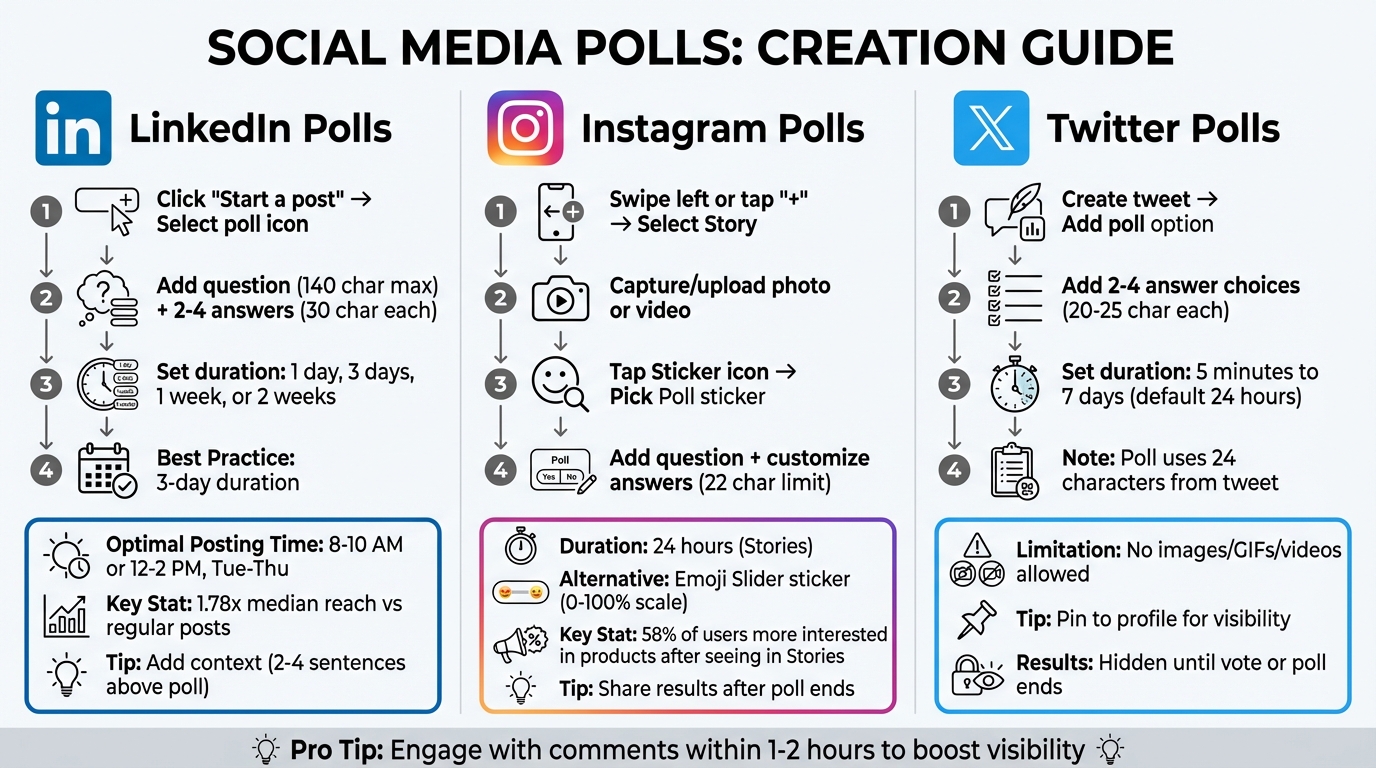
Step-by-Step Guide to Creating Polls on LinkedIn, Instagram, and Twitter
Each social media platform has its own way of handling polls, but the basic idea is simple: make it effortless for your audience to participate.
Creating Polls on LinkedIn
LinkedIn polls work especially well for B2B purposes, as they let you see who voted and what they chose. To create one, start by clicking "Start a post" and then selecting the poll icon. Add your question (up to 140 characters) and 2–4 answer options (each limited to 30 characters). You can set the poll duration to 1 day, 3 days, 1 week, or 2 weeks. A 3-day duration often strikes the right balance, creating urgency while leaving enough time to share the poll widely.
Write 2–4 sentences above your poll to explain its context. Including options like "Other (comment below)" or "Depends (see comments)" can encourage users to leave comments, which helps boost the poll’s visibility. Posting during peak hours – such as 8–10 AM or 12–2 PM on Tuesday, Wednesday, or Thursday – reaches professionals at optimal times. Engaging with comments within the first 1–2 hours also helps drive more interaction. LinkedIn polls have been found to achieve 1.78x the median reach compared to regular posts.
"Polls are a reach tool, not an engagement strategy. Use them to expand visibility, test ideas, and learn what your audience cares about."
- Ivana Todorović, AuthoredUp
Once you’ve mastered LinkedIn polls, Instagram Stories offer another great way to connect with your audience.
Creating Polls on Instagram
Instagram polls are featured in Stories and vanish after 24 hours, making them perfect for grabbing quick attention. To create one, swipe left on the app or tap the "+" icon, then select Story. You can capture a new photo or video or upload one from your gallery. Next, tap the Sticker icon (the smiley face) and pick the Poll sticker. Add your question and customize the answer options (default options are "Yes" and "No", with a 22-character limit per option). Place the sticker near the center of the screen to avoid overlapping with other UI elements.
For a more interactive twist, try the Emoji Slider sticker. This allows users to slide an emoji along a scale from 0% to 100% to show their level of interest. While the poll is live, you can check who voted by swiping up or tapping the "Seen by" icon. Once the poll ends, sharing the results in your Story can keep participants engaged. Interestingly, 58% of surveyed users said they were more interested in a product or service after seeing it in a brand’s Stories.
If you’re looking for fast feedback, Twitter polls are a straightforward option, and you can find more insights from Upward Engine on maximizing social engagement.
Creating Polls on Twitter
Twitter polls are great for quick, real-time input. You can include 2–4 answer choices, and the poll can run anywhere from five minutes to seven days, with 24 hours as the default. Keep in mind that the poll setup uses 24 characters from your tweet, and each answer option is limited to 20–25 characters. Unlike other platforms, you can’t add images, GIFs, or videos to a poll tweet.
Poll results are hidden until someone votes or the poll ends, which creates a sense of curiosity. To get more eyes on your poll, consider pinning it to your profile and promoting it with follow-up tweets linking back to the poll. Twitter polls work well for casual engagement, such as pop quizzes or gathering ideas for future content.
"Twitter polls aren’t really a reliable way to find sophisticated market data, they can be used to engage your audience by asking for follower insights."
- Bethany Cartwright, HubSpot
Writing Poll Questions That Reveal Lead Insights
When it comes to creating polls that provide meaningful insights, the way you frame your questions makes all the difference. A well-crafted poll can help you gather useful data, while a poorly phrased one might just add to the noise. Neutral framing is key here – steer clear of leading questions like "Don’t you agree that…?" as they tend to push respondents toward a particular answer, skewing your results. Instead, aim for questions that split your audience evenly between options. This kind of balance encourages discussion and uncovers genuine opinions. Also, make sure your poll questions align with your business goals to ensure the insights you gather are actionable.
Polls can also act as subtle qualifiers, segmenting your leads without the need for lengthy forms. For instance, a question like "When are you planning to address [problem area]?" quickly distinguishes between those ready to take action and those still in the research phase. Similarly, asking "What’s your primary tool for [specific task]?" can highlight opportunities to either replace a competitor’s solution or connect with prospects who don’t yet have one.
Don’t forget to include an "Other" option. This allows respondents to share unique cases in the comments, boosting engagement. Higher engagement often signals platform algorithms to amplify your post’s reach. To make your poll mobile-friendly, use a two-part structure: provide 2–4 sentences of context above the poll, and keep the actual question under 140 characters for easy scanning.
Aligning Poll Questions with Your Business Goals
Your poll questions should match the stage of your sales funnel. At the awareness stage, use simple "this or that" polls to gauge what your audience values. For example, "Product vs. Distribution: what matters more?" can reveal priorities without requiring a commitment. In the middle of the funnel, ask more targeted questions about challenges or tools to better understand your audience’s needs. At the decision stage, focus on buying timelines or feature preferences to uncover objections early and identify high-intent leads.
Make the most of all four poll options to maximize participation. Set the duration to 3 days – this creates a sense of urgency while giving the algorithm enough time to circulate your poll. Timing also matters: post on Tuesday, Wednesday, or Thursday between 8:00 AM and 10:00 AM in your audience’s timezone to catch professionals during their morning routine.
"The difference between a poll that gets 50 votes and one that gets 500 comes down to how you frame the question, when you post it, and what you do after it ends."
- Shanjai Raj, Founder at Postking
Examples of Effective Poll Questions
Here are a few question formats tailored to specific goals:
- Pain point identifier polls: "What is your #1 obstacle to [outcome]?" This helps you find prospects struggling with issues your solution can address.
- Budget priority polls: "Where are you increasing investment this year?" These reveal where your audience is focusing their resources.
- Current solution assessment polls: "What is your primary tool for [task]?" This helps you identify opportunities to replace competitors or reach prospects without a solution.
- Buying timeline polls: Options like "Already working on it", "Next quarter", or "Researching options" help gauge urgency.
- Feature preference polls: These questions uncover which product features resonate most, helping you refine your follow-up messaging.
- Industry-specific scenario polls: Present workflows or challenges unique to your audience. This can highlight prospects using manual processes who may be ready for automation.
Each of these formats provides insights you can use to personalize outreach and effectively nurture leads, ensuring your polls don’t just engage but also deliver data that drives better decision-making.
Analyzing Poll Results to Identify and Qualify Leads
Once your poll wraps up, it’s time to dive into the results. This isn’t just about counting votes – it’s about uncovering who is interested and why. Platforms like LinkedIn make this process straightforward by allowing you to see exactly who voted and what they chose. This means you can instantly qualify leads without needing them to fill out forms. By examining the data, you gain insights into buying intent, pain points, and how ready someone might be to engage. Essentially, your poll evolves from a simple engagement tool into a strategic way to segment your audience and sharpen your follow-up efforts.
"A vote is more than engagement. A vote is behavior. And behavior reveals intention."
- Scott Aaron
Using Poll Data to Segment Your Audience
Each poll option should correspond to a specific buyer category. When structured this way, every response helps you sort leads into actionable groups. For example, imagine you ask, "What’s your biggest challenge with [specific task]?" and offer options like:
- "We do it manually."
- "We use a tool but it’s messy."
- "We have it figured out."
These answers immediately group your respondents into three categories: high-intent prospects struggling with manual tasks, medium-intent leads using subpar tools, and low-priority contacts who aren’t currently seeking help.
To take it a step further, sync these responses with your CRM by tagging or creating custom fields. This allows you to set up personalized follow-up actions. For instance, someone who votes "Already working on it" might get a different email sequence than someone who picks "Researching options." This setup ensures your outreach is tailored and efficient.
Once your audience is segmented, the next step is identifying which leads deserve your immediate attention.
Identifying High-Intent Responders
Focus on those showing clear buying signals. High-intent responders – those who indicate struggles like "Manual process" or "Struggling with this" – should be your top priority. These are the people actively dealing with challenges you can solve or planning to invest in a solution soon.
Act quickly. Within 24–48 hours, review the responses and send personalized messages. Reference their specific challenges directly, such as, "I noticed you mentioned [Pain Point] as your biggest hurdle." This approach makes your outreach feel relevant and helpful, not like a generic sales pitch. And it works – interactive content like polls generates inbound leads that convert at a rate of 14.6%, compared to just 1.7% for cold outreach. Treating these responders as warm leads can dramatically improve your chances of closing the deal.
Following Up with Poll Responders to Nurture Leads
Now that you’ve pinpointed your high-intent responders, it’s time to turn those poll votes into meaningful conversations. The trick? Act fast and keep it personal. A simple vote is like an open door, inviting you to start a dialogue.
Personalized Engagement Strategies
Timing matters. Reach out within 48 hours while the poll topic is still fresh in their minds. When you connect, start by thanking them for voting. Then, ask something like, "What influenced your choice of [Option X]?" This approach shifts the interaction from public engagement to a one-on-one conversation. It’s what some call the "Poll-to-Conversation" method: acknowledge the vote, ask a clarifying question – like "How is this challenge affecting your business?" – and only offer resources when it’s clear they can help. This personal touch works: emails tailored to individuals generate 2.5 times higher click-through rates.
"Polls are the only feature on LinkedIn that allows your audience to identify themselves based on interest, preference, behavior, or challenge without you having to chase them."
- Scott Aaron, Founder, The Time To Grow
Don’t let any interaction slip through the cracks. Log each one in your CRM to keep track of your leads. Then, use the insights you gather to fine-tune your email campaigns and keep nurturing those connections.
Adding Poll Leads to Email Campaigns
Once you’ve initiated personal outreach, build on that momentum by incorporating these leads into targeted email campaigns. Thanks to the segmentation achieved through your poll responses, you can sync these insights into your CRM as tags or custom fields. For instance, if someone highlights lead generation as their biggest hurdle, add them to a drip campaign focused on solving that specific challenge.
A great follow-up strategy is the "Results Reveal" email. Within 24–48 hours of your poll closing, send an email sharing the poll results, comparing them to industry benchmarks, and offering a deeper dive into the most popular choice. This not only closes the loop but also keeps your audience engaged. You can even sweeten the deal by offering personalized benchmark reports or "see how you compare" insights in exchange for additional contact details.
Here’s why this works: 51% of email marketers say segmentation is the most effective way to deliver a personalized experience. Your poll has already done much of this work for you. Plus, nurtured leads tend to spend 47% more, and nurturing emails see response rates 4 to 10 times higher than generic email blasts. By treating poll responders as warm, segmented leads rather than cold prospects, you dramatically improve your chances of converting them into loyal customers.
Conclusion
Polls are an excellent way to turn simple interactions into meaningful insights. By asking the right questions, posting at the best times, and following up strategically, you can convert casual participants into potential leads.
Each vote represents a glimpse into user intent. Whether you’re using LinkedIn, Instagram, or Twitter, polls allow you to gather valuable data to segment your audience, identify engaged users, and craft personalized follow-ups. Remember, nurtured leads tend to spend 47% more on average than those who aren’t nurtured. This means the effort you invest in this strategy can deliver substantial returns.
"Polls outperform static content by reducing friction, prompting immediate responses." – My Toolbox Pro
With this framework in hand, consider starting small – create a poll this week with a clear business objective in mind. Pay attention to who votes, their choices, and how they respond to your follow-up efforts. Use this data to enrich your CRM and turn these interactions into meaningful conversations. If you’re ready to scale this method or need expert guidance, Upward Engine provides social media marketing services to help you maximize both engagement and ROI.
FAQs
What should I do with poll results after it ends?
After wrapping up a poll, take a moment to dive into the results. They can reveal a lot about your audience’s preferences, interests, or challenges. Use this information to fine-tune your next steps, like tailoring your outreach or updating content to better address their needs.
Sharing the results with your audience can be a game-changer too. It not only boosts engagement but also shows that you genuinely value their input. Plus, it helps build trust and strengthens the bond with your audience.
How do I turn poll voters into leads without being pushy?
Engage with voters in a meaningful way once your poll wraps up. Respond to their comments thoughtfully, share the results, and connect them back to your products or services in a way that feels relevant and helpful. You can also include soft calls-to-action, such as offering a free resource or inviting them to reach out for more details. The key is to prioritize authenticity and support, steering clear of pushy approaches. This helps build trust, laying the groundwork for conversions to happen naturally over time.
How can I track poll responses in my CRM?
You can keep tabs on poll responses by integrating data from social media platforms like LinkedIn directly into your CRM. Start by using the platform’s analytics tools or integrations to gather poll responses. Once collected, sync this data with your CRM system.
This setup helps you monitor engagement levels, evaluate performance metrics, and assign tasks for lead nurturing more efficiently. Just make sure your CRM and tools support data imports or integrations to streamline the entire process.


