
Want to boost sales and streamline your processes? Integrating your CRM and marketing automation tools is the answer. Here’s why it matters:
- Improved Collaboration: Sales and marketing teams can share real-time data, eliminating miscommunication and manual updates.
- Higher ROI: Integrated systems deliver an average return of $5.44 for every $1 spent.
- Faster Sales Cycles: Companies using integrated tools report 20% shorter sales cycles.
- Better Decision-Making: Access to unified data enables smarter, data-driven strategies.
This guide explains how integration works, its benefits, and how to implement it step-by-step. By syncing systems, you ensure both teams work with accurate, up-to-date information, driving better customer engagement and higher revenue.
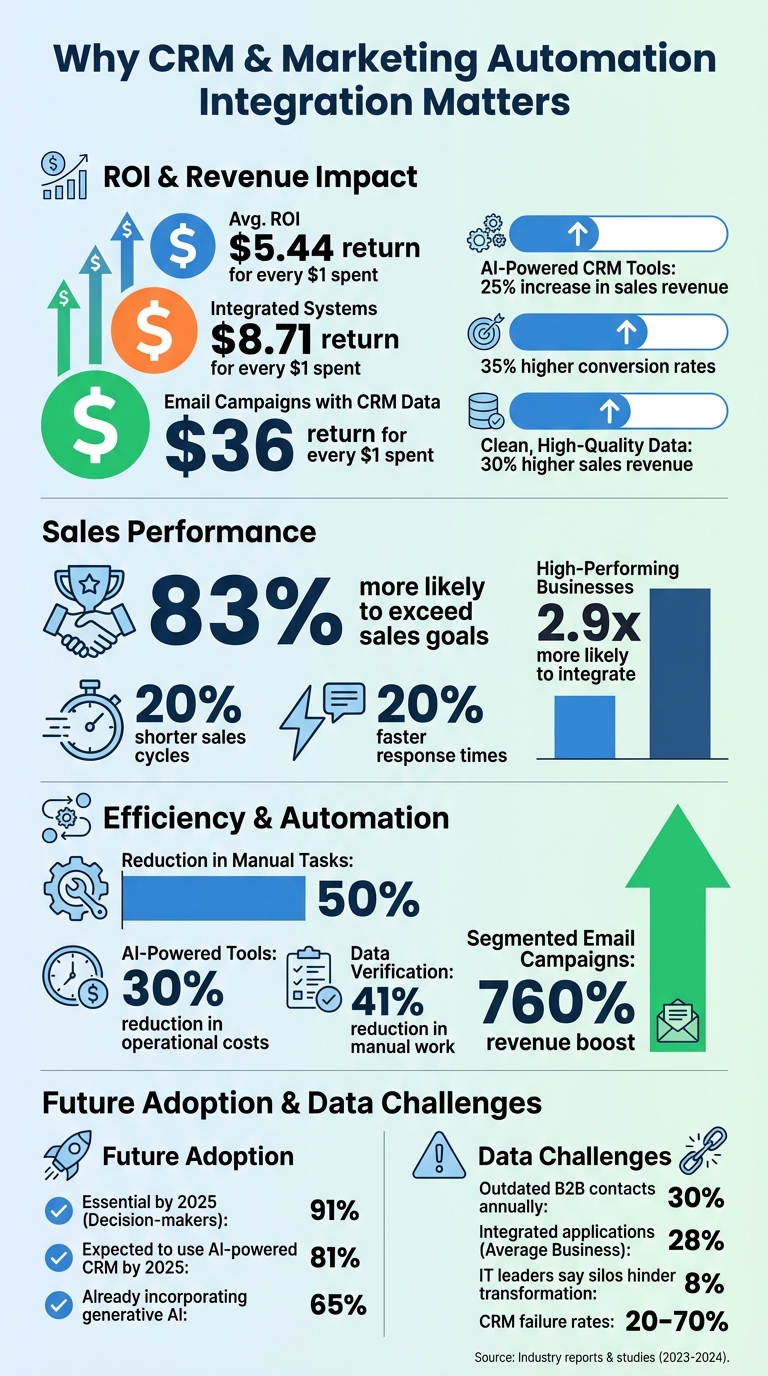
CRM and Marketing Automation Integration: Key Statistics and ROI Benefits
Integrating CRM and Marketing Automation: Unifying Data for a Complete Customer View
sbb-itb-7a4ada9
Why CRM and Marketing Automation Integration Matters in 2026
Bringing CRM and marketing automation together isn’t just a technical upgrade – it’s a game-changer for boosting revenue. Companies that integrate these systems are 83% more likely to exceed their sales goals. On the flip side, businesses using disconnected tools often have to rely on guesswork instead of actionable insights. The advantages of integration shine in three main areas: managing customer relationships, improving marketing efficiency, and making smarter, data-driven decisions.
Improving Customer Relationship Management
One of the biggest wins from integration is how it transforms customer relationship management. By creating a unified customer view, businesses can eliminate data silos and ensure both sales and marketing teams are working from the same playbook. This means no more awkward missteps, like sending acquisition ads to long-time customers or nurture emails for products already discussed with sales.
The results speak for themselves. When behavioral data – like website visits or content downloads – syncs with CRM records, companies can deliver personalized experiences at scale. Instead of generic campaigns, customers receive tailored content that aligns with their actions and preferences. Plus, when a lead hits a certain score threshold, automated workflows can instantly assign them to the right sales rep with all the context they need. This reduces response times, keeps leads warm, and speeds up the sales cycle.
It’s no surprise that high-performing businesses are 2.9 times more likely to integrate CRM with marketing automation. The payoff is impressive: integrated systems yield an average return of $8.71 for every $1 spent, while email campaigns powered by CRM data can generate $36 for every $1 spent.
Making Marketing Campaigns More Efficient
Another major benefit is the efficiency boost. Integration can cut up to 50% of manual tasks, like data entry or lead routing, by automating these processes. A bidirectional data flow ensures marketing teams are alerted when sales update a deal stage, and sales teams know instantly when high-intent prospects engage with content.
This automation speeds things up significantly. Response times drop by 20%, and hot leads are acted on immediately. Only high-quality leads – those meeting specific scoring criteria – sync to the CRM, keeping the sales pipeline clean and manageable. As a result, teams can shift their focus from administrative tasks to strategic planning and relationship building.
And the need for automation is only growing. By 2025, 91% of decision-makers expect automation to be essential for meeting customer demands for personalization. With integration in place, businesses are better equipped to handle these challenges while improving overall efficiency.
Making Better Decisions with Data
Integration doesn’t just streamline operations – it also lays the groundwork for smarter decisions. Closed-loop reporting is a standout feature, letting businesses track the entire customer journey from the first marketing touchpoint to the final sale. This kind of visibility turns decision-making into a proactive, data-driven process.
By merging behavioral data (like clicks and downloads) with transactional data (like deal stages or opportunity values), businesses unlock predictive insights. AI-enhanced systems can forecast deal outcomes, identify risks, and spot high-intent signals before prospects even reach out to sales. Companies using AI-powered CRM tools report a 25% increase in sales revenue and a 30% reduction in operational costs.
Integration also makes multi-touch attribution possible. Instead of oversimplifying credit to the first or last interaction, businesses can accurately account for all the key touchpoints along the customer journey. Real-time dashboards pull data from multiple channels, allowing for immediate campaign adjustments rather than waiting for monthly reports. The average ROI? $5.44 for every dollar spent on integrated CRM and marketing automation technologies.
"When your tech stack is a collection of disconnected tools, your teams are forced to operate on assumptions instead of insights. The result is a reactive, inefficient revenue engine."
The future is clear. With 81% of organizations expected to use AI-powered CRM by 2025 and 65% already incorporating generative AI into their systems, integration is no longer optional. It’s the foundation for smarter, scalable growth in an increasingly competitive market.
How to Integrate CRM and Marketing Automation: Step-by-Step
Getting your CRM and marketing automation tools to work together takes careful planning and attention to detail. When done right, this integration can unlock better decision-making and streamline your processes. But the key to success lies in preparation. Here’s a breakdown of how to tackle each step effectively.
Evaluating Your Current Tools and Requirements
Before jumping into the technical details, you need to fully understand the tools and systems you’re working with. Start by forming a team with members from Marketing Operations, Sales Operations, and IT/Security. Their combined expertise will help you address both technical and operational challenges.
Begin with a technical inventory. Identify your CRM platform version, existing integrations, custom fields, data volume, and the capabilities of APIs or middleware tools. This is essential because data silos can cause significant roadblocks – 81% of IT leaders say silos hinder their digital transformation efforts, and most businesses have only integrated 28% of their applications.
Next, audit your lead management process. Map out how leads move through your funnel, from initial contact to sales handoff. Document lifecycle stages, sales methodologies, and campaign workflows, as well as reporting needs.
Don’t forget to assess your data quality. Review duplicate records, incomplete fields, and inconsistencies like "USA" versus "United States." Standardize key fields – such as country, industry, and lead source – before syncing systems. This prevents the classic "garbage in, garbage out" scenario. Finally, survey sales and marketing teams to understand their frustrations and wish-list features. Poor user adoption remains a major issue, with CRM failure rates ranging between 20% and 70%.
"A successful CRM and marketing automation integration is 90% strategy and only 10% technology" – MarTech Do
| Assessment Category | Key Elements to Review |
|---|---|
| Technical Inventory | Platform versions, API limits, custom objects, security models, data storage usage |
| Process Audit | Lead handoff procedures, sales stages, campaign triggers, attribution requirements |
| Data Quality | Duplicate records, field completion rates, standardized formatting, obsolete data |
| User Requirements | Team pain points, desired automation features, mobile accessibility needs |
With this groundwork in place, you’re ready to define clear data fields and syncing rules.
Setting Up Data Fields and Sync Rules
Now it’s time to define how data will flow between your systems. Start by identifying the "source of truth" for each field. For example, CRMs typically manage firmographic and sales data – like account names, industries, and opportunity stages – while marketing automation tools handle behavioral data, such as email engagement and lead scores.
Create a data dictionary that documents every field you plan to sync. Use the "Four-Column Rule": for each field, list the Source Field, Destination Field, Field Type (to ensure compatibility), and Transformation Logic (e.g., converting "Customer" to "Client"). Address any required fields upfront because missing data can cause sync failures.
Decide whether you need unidirectional or bidirectional syncing. Unidirectional sync works well for protecting master data or sharing engagement data with the CRM. Bidirectional sync is better for fields like contact details, where updates should reflect in both systems. However, test bidirectional setups thoroughly to avoid issues like infinite update loops that can clog APIs.
Use inclusion lists to control what gets synced. For example, only send sales-ready leads – those meeting a specific score or lifecycle stage – to the CRM. Additionally, configure hidden fields in marketing forms to capture UTM parameters and map them to CRM fields for accurate attribution.
| Data Category | Recommended Source of Truth | Examples |
|---|---|---|
| Firmographic/Sales | CRM (e.g., Salesforce) | Account Name, Industry, Opportunity Stage, Notes |
| Behavioral/Engagement | Marketing Automation (e.g., HubSpot) | Email Opens, Form Submissions, Lead Score, Page Views |
Testing and Launching Your Integration
With your data fields and sync rules in place, it’s time to test. Never launch an integration directly into production. Use a sandbox or trial environment to troubleshoot without risking live data.
"The fastest way to amplify chaos in your business is to automate a messy process" – Trent Little, Evenbound
Start with a "10-Record Test." Manually sync 10 records that represent different scenarios, such as a new lead, an existing customer, or a record with unusual formatting. This helps confirm that data lands in the correct fields and transformation logic is working as intended.
Next, conduct User Acceptance Testing (UAT). Involve sales and marketing users to simulate real-world workflows. Create a checklist to verify lead creation speed, data accuracy, and the smooth handoff from MQL to SQL. Ensure unsubscribe and opt-out statuses sync immediately for compliance.
Before going live, record baseline metrics like conversion rates and sales cycle times. After launch, monitor sync error logs and data quality reports to catch issues early. Schedule follow-up sessions with users to address any questions and reinforce training. Highlight how the integration benefits their specific goals, such as quicker access to qualified leads or better revenue tracking, to encourage adoption.
| Testing Phase | Key Objective | Critical Action |
|---|---|---|
| Sandbox/Trial | Technical Validation | Check for API loops and sync errors in a test setup |
| 10-Record Test | Mapping Verification | Sync a small batch to ensure data accuracy |
| UAT | Workflow Practicality | Run real scenarios with sales and marketing teams |
| Scenario Testing | Edge Case Discovery | Test paths like "disqualified prospect" or "reactivation" |
| Post-Launch Audit | Ongoing Optimization | Monitor error rates and update processes quarterly |
Common Integration Challenges and Solutions
Once your integration is in place, you’ll likely face a few bumps along the road during implementation. These challenges are common, but with the right strategies, they can be managed effectively. Here’s a closer look at what might come up and how to address it.
Fixing Data Silos and Inconsistencies
Disconnected systems often lead to fragmented data. For instance, marketing might track email clicks and downloads, while sales holds onto conversation notes and deal histories – but neither team has access to the full picture. This lack of alignment forces teams to rely on guesses instead of solid insights.
Some typical issues include duplicate records, inconsistent data formatting, and missing information. You might discover multiple entries for the same contact or incomplete profiles missing key details like job titles or industry information. These gaps can derail targeted campaigns.
To tackle this, start by cleaning your data. Deduplicate records using email addresses as unique identifiers, standardize picklist values for fields like country and industry, and fill in missing details with third-party enrichment tools like Clearbit or ZoomInfo. Consistent formatting across all fields is essential.
Next, establish a clear “source of truth.” For example, let your CRM manage firmographic and sales data, while marketing automation platforms handle behavioral data. This prevents confusion and ensures both systems work in harmony.
Finally, use inclusion lists to control what data gets synced. Only send sales-ready leads – those that meet specific criteria like a lead score or lifecycle stage – to your CRM. This avoids overwhelming your sales team with unqualified contacts.
Once your data is clean and unified, you’re ready to address technical integration issues.
Resolving Technical Compatibility Problems
Getting your systems to communicate effectively is the next hurdle. Integration relies on tools like APIs, webhooks, and middleware platforms (e.g., Zapier or Make) to connect your systems seamlessly. While native integrations – like HubSpot CRM paired with HubSpot Marketing Hub – are easier to set up, cross-platform connections may require custom API development or middleware support.
One common problem is mapping custom fields, such as UTM parameters, between systems. Mismatched field types (e.g., syncing a text field to a number field) can cause sync failures.
To address this, assemble a team with members from Marketing Operations, Sales Operations, and IT. This group will act as your technical go-to team, ensuring API limits, custom objects, and security models are all accounted for before launch. Standardize critical data fields – like phone number formats – to make sure features like click-to-dial and SMS function properly. Configure sync rules to detect existing records using unique identifiers (typically email addresses) to avoid duplicates. Decide whether a unidirectional or bidirectional sync best fits your needs, and thoroughly test bidirectional setups to prevent endless update loops.
Getting Your Team to Adopt the New System
Even with a flawless technical setup, user adoption can make or break your integration. Often, the system itself works fine, but teams resist using it because they don’t see the value or feel overwhelmed by the change.
To encourage adoption, involve your teams early. Include representatives from sales, marketing, and IT in the decision-making process. Identify “champions” in each department who can mentor their peers and advocate for the system.
Highlight the benefits: show how the integration reduces repetitive tasks like manual data entry and helps teams hit their goals. For example, sales teams gain access to full engagement histories, enabling more personalized follow-ups, while marketing can better track how spending leads to closed deals.
Offer role-specific training and standardize key definitions, such as what qualifies as an "MQL" or "SQL", to avoid confusion. Roll out the system in phases, starting with a small pilot group to iron out issues and celebrate quick wins. Finally, set up feedback channels to continually improve the system based on user input. This approach ensures everyone feels heard and invested in the success of the integration.
How to Maintain and Improve Your Integration Over Time
Your integration isn’t something you set up once and forget about. It’s a dynamic system that needs regular upkeep to stay effective, especially as your business evolves. Routine maintenance ensures everything runs smoothly and continues to deliver value.
Conducting Regular Data Audits
Did you know that around 30% of B2B contact information becomes outdated each year due to job changes and company restructures? That’s a lot of clutter that can mess up your analytics and decision-making.
To stay ahead, schedule a full audit of your integration settings and data mapping at least once a year. Pair that with quarterly reviews of sync error logs and data quality reports. During these audits, aim for these benchmarks:
- Keep duplicate records under 2% of your database.
- Ensure 95% of critical fields (like email and phone numbers) are complete.
- Standardize formatting for 100% of phone numbers and addresses.
Get a team together for this effort. Include Data Stewards to oversee quality, CRM Administrators for the technical work, and Sales/Marketing Operations to provide user feedback. Before making any major updates, always back up your CRM data to avoid losing important information. Use tools like fuzzy matching algorithms to spot near-duplicates (e.g., "Bob Smith" vs. "Robert Smith") and replace free-text fields with standardized picklists for fields like country, industry, or lead source to keep things consistent.
Why does this matter? Companies with clean, high-quality data report up to 30% higher sales revenue. Plus, proper data verification can cut down manual work by as much as 41%.
Using Analytics to Track Performance
Once your data is clean, analytics become your best friend for tracking how well your integration is working. Closed-loop reporting, for example, ties marketing efforts directly to sales outcomes, helping you see which campaigns are driving results.
Keep an eye on metrics like:
- Lead response time
- MQL-to-SQL conversion rate
- True cost per acquisition (broken down by campaign)
Also, track marketing-sourced revenue to link closed deals back to specific campaigns. Multi-touch attribution is another must – it helps you identify which pieces of content are speeding up deal closures, rather than just crediting the first or last touchpoint.
Refine your lead scoring models regularly by factoring in CRM updates, like changes in sales status or new opportunity creation. By 2026, AI-powered tools will even analyze campaign performance in real time and suggest tweaks to optimize results.
Set performance baselines before making changes so you can measure improvement accurately. Clean data also makes segmented email campaigns more effective, potentially boosting revenue by 760%.
Adjusting Integration as Your Business Grows
Growth brings new challenges – and opportunities – for your integration. Start with the essentials, like connecting email and CRM systems, then gradually add tools like social media platforms, eCommerce systems, and business intelligence software as your needs expand.
Remember, integrating your CRM with marketing automation isn’t a one-time task. It’s an ongoing process that should evolve alongside your business goals.
As lead volume increases, tighten your sync criteria to ensure only high-quality prospects make it into your CRM. This avoids clutter and keeps your sales team focused on the best opportunities.
Keep communication open with your sales and marketing teams to identify workflow improvements based on their experiences. Support any changes with clear training materials and regular Q&A sessions. Automate the MQL-to-SQL handoff by setting up triggers that immediately assign ownership and create tasks in the CRM. This ensures nothing falls through the cracks, even as lead volume grows.
The payoff is worth it. Businesses see an average return of $5.44 for every dollar spent on CRM and marketing automation technologies.
Conclusion
Bringing CRM and marketing automation together isn’t just a tech upgrade – it’s a game-changer for your business. The numbers tell the story: companies with integrated systems enjoy 35% higher conversion rates and cut their sales cycles by 20%. Plus, top-performing marketing teams are nearly three times more likely to rely on integrated systems compared to their less successful peers.
To make the most of integration, think of it as a journey. Start small – link your CRM with email for quick wins – and then scale up as your needs evolve. Before syncing, clean your data, establish clear lifecycle stages that both marketing and sales can agree on, and ensure real-time, two-way data sharing. This approach not only eliminates silos but also ensures your teams are always working with accurate, up-to-date information.
As Mohit Thakur, a digital marketing expert, puts it:
"The distinction between having marketing automation tools and having integrated marketing automation tools is the difference between a collection of instruments and an orchestra."
By 2026, integration will be the backbone for businesses aiming to scale personalized customer experiences without needing to expand their teams. The winners won’t be those with the largest staff – they’ll be the ones leveraging smart automation to do more with less.
For businesses ready to take the leap, Upward Engine offers expert services to simplify the process. From data mapping and sync rules to ongoing optimization, we handle the heavy lifting so you can focus on growth. Whether it’s SEO, paid ads, or building a complete digital marketing system, we craft solutions tailored to deliver measurable results. Visit upwardengine.com to see how we can help turn your disconnected tools into a unified revenue engine.
FAQs
Which data should sync between my CRM and marketing automation?
When it comes to syncing data, focus on the essentials: contact details (like name, email, and phone number), behavioral data (such as website visits, downloads, and email interactions), and lead status or lifecycle stage.
Why does this matter? Synchronization gives sales teams the insights they need to craft personalized outreach. For instance, if a prospect downloads a whitepaper or interacts with specific content, that activity should automatically update their CRM profile. This added context helps sales reps tailor their approach.
Proper syncing also minimizes errors, streamlines workflows, and ensures marketing and sales stay on the same page with reliable, real-time information.
Do I need one-way or two-way syncing?
When deciding between one-way and two-way syncing, it all comes down to what your business needs. If you’re aiming for real-time updates and seamless communication between your CRM and marketing automation tools, two-way syncing is the way to go. It ensures that data stays consistent across platforms and avoids creating isolated data pockets.
On the other hand, if your goal is more straightforward – like transferring data in a single direction (for instance, from your CRM to a marketing platform) – one-way syncing might be all you need to keep customer information accurate and up to date.
How can I measure ROI after integration?
To gauge ROI after combining CRM and marketing automation, focus on key metrics such as lead conversion rates, sales velocity, and revenue growth both before and after the integration. Implement closed-loop reporting to tie marketing activities directly to sales results, assigning revenue to particular campaigns. This approach highlights how smoother data sharing and better customer insights impact revenue and operational efficiency, ensuring the integration supports your business growth objectives.