Want better SEO rankings? Start by improving your content’s readability as part of a complete website transformation.
Readable content keeps users engaged, reduces bounce rates, and indirectly boosts search rankings. While readability isn’t a direct ranking factor, it shapes key metrics like dwell time and retention, which search engines rely on to evaluate content quality.
Here’s what you need to know:
- 50% of U.S. adults read at or below a 9th-grade level. Writing at a 7th–9th grade level ensures broader accessibility.
- 73% of users leave a page within 10 seconds if it’s hard to read. Clear, scannable text keeps them on your site longer.
- Mobile matters. With over 60% of searches happening on mobile, concise paragraphs and larger fonts are essential.
- SEO metrics improve with readability. Content scoring 60–70 on the Flesch Reading Ease scale generates 30% more leads.
To optimize readability:
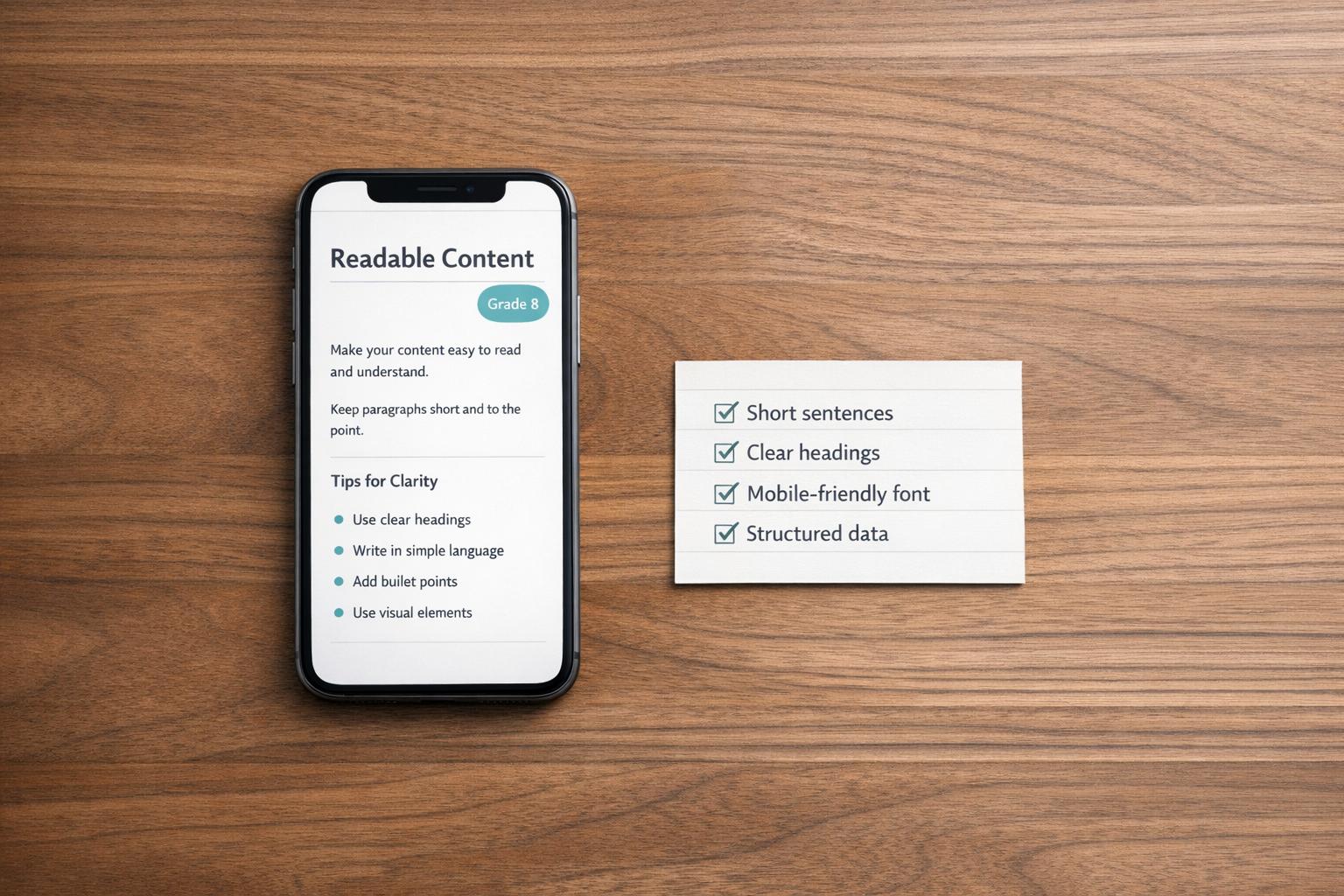
- Use short sentences (under 20 words) and paragraphs (2–4 lines).
- Write in plain language and avoid jargon.
- Structure content with clear headings, bullet points, and white space.
- Prioritize mobile-friendly formatting with a font size of 16–18px.
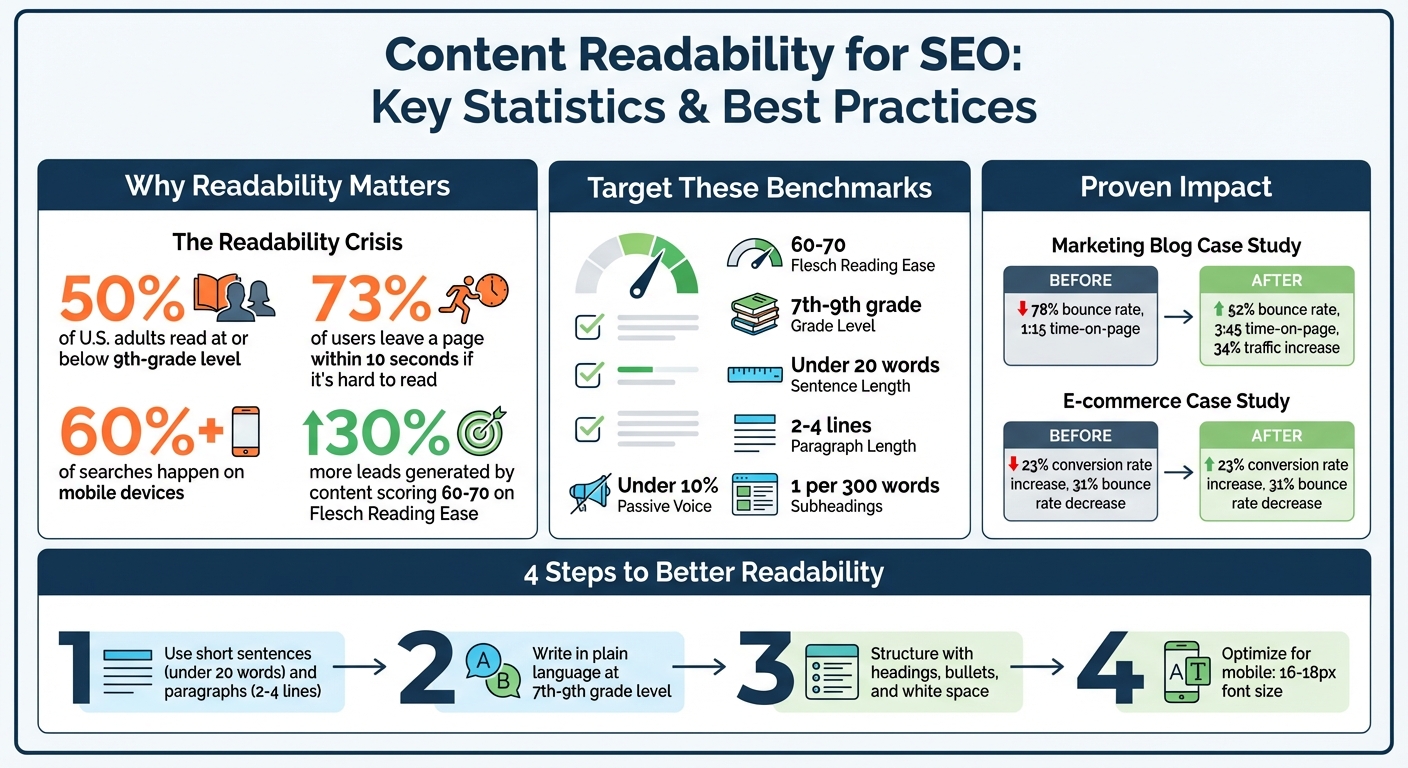
Content Readability Impact on SEO: Key Statistics and Best Practices
5 Ways To Improve Content Readability And Sell More
sbb-itb-7a4ada9
Why Content Readability Affects SEO Rankings
Readability might not be a direct ranking factor, but it plays a major role in shaping engagement signals that search engines rely on to assess content quality. When visitors land on a page filled with cluttered text or complex jargon, they often leave quickly. This behavior – commonly called "quick bounces" – tells search engines that the content didn’t meet user expectations. On the other hand, clear and well-organized writing encourages visitors to stay longer, reduces bounce rates, and signals that your content provides genuine value.
Metrics like dwell time, bounce rate, and retention illustrate how readability indirectly impacts rankings. If readers can easily understand your main points, they’re more likely to explore further, click on internal links, and spend more time engaging with your site. Let’s dive into how improved readability changes user behavior.
How Readability Affects User Behavior
Readable content directly influences how long visitors stick around and whether they continue exploring your site. By using clear subheadings, keeping sentences under 20 words, and limiting paragraphs to 2–4 lines, you align with the natural scanning habits of online readers. This structure helps users find the answers they’re looking for quickly, reducing bounce rates and increasing the chances they’ll visit other pages.
Here’s an example: a marketing blog with a 78% bounce rate and an average time-on-page of just 1 minute and 15 seconds decided to focus on readability. They shortened average sentence length from 25 to 15 words and increased font size to 17px. After 90 days, their bounce rate dropped to 52%, time-on-page jumped to 3 minutes and 45 seconds, and organic traffic grew by 34%. Similarly, an electronics retailer improved technical product descriptions by using scannable, benefit-driven bullet points. The result? A 23% boost in conversion rates and a 31% drop in product page bounce rates.
"The most successful SEO strategies we’ve implemented always prioritize user experience through readable, well-structured content."
- Danny Andrews, Head of SEO at Wordologists
When users find your content easy to navigate – what the Fogg behavior model calls the "ability" factor – they’re more likely to stay engaged. These positive interactions feed directly into better SEO performance.
How Readability Connects to SEO Metrics
The impact of readability on user behavior translates into stronger SEO metrics. For instance, content with readability scores between 60–70 on the Flesch Reading Ease scale generates about 30% more leads compared to poorly rated content, based on an analysis of over 50,000 blog posts. Additionally, clear and direct meta descriptions and page titles improve click-through rates by making users feel more confident about what they’ll find.
For businesses targeting U.S. audiences, readability can be a game-changer. Around 50% of U.S. adults read at or below a ninth-grade level. Writing at a 7th–9th grade level ensures you’re reaching a broad audience without alienating anyone. This approach boosts engagement metrics like time-on-page, lowers bounce rates, and drives higher conversion rates – key components of long-term organic success.
| Metric | Ideal Range for SEO | Impact on User Behavior |
|---|---|---|
| Flesch Reading Ease | 60–70 | Increases Dwell Time |
| Flesch-Kincaid Grade Level | 7th–9th Grade | Reduces Bounce Rate |
| Average Sentence Length | Under 20 words | Improves Comprehension |
| Paragraph Length | 2–4 lines | Enhances Scannability |
| Passive Voice Usage | Under 10% | Increases Engagement |
| Subheading Frequency | 1 per 300 words | Guides Navigation |
Using straightforward sentence structures – like a simple subject-verb-object format – also helps AI models process your content more effectively. This increases the likelihood that your pages will rank for relevant searches. As search technology shifts toward AI-driven summaries and voice search, keeping your content readable will be essential for maintaining visibility and staying competitive.
What Search Engines Look for in Readable Content
Search engines don’t directly measure readability scores but instead focus on content structure and how users interact with it. Google’s algorithms, powered by natural language processing (NLP), identify "semantic triples" to grasp the core meaning of your content. Writing in clear, straightforward language with proper formatting helps these systems better understand and match your content to relevant searches.
The link between readability and rankings lies in user engagement. If visitors quickly leave your page, a behavior known as "pogo-sticking", search engines interpret this as a sign that your content didn’t meet their needs. On the flip side, longer visits, more scrolling, and deeper exploration signal value to search engines.
"If you write content that’s hard to understand, then it’s going to be harder for people to stay and read. Lower user engagement can indirectly affect your ranking over time."
- John Mueller, Search Advocate, Google
Modern search engines also use passage-level indexing, meaning they can rank specific sections of your page independently. This makes formatting – like clear subheadings and concise paragraphs – essential. Well-structured content allows search engines to extract relevant sections for featured snippets, AI summaries, and voice search results.
Optimal Reading Levels for Web Content
Writing at a 7th–9th grade reading level increases your chances of ranking for featured snippets and voice search queries. This isn’t about oversimplifying your message – it’s about making your knowledge accessible to a broad audience. Using this reading level ensures your content is easy to understand while maintaining authority.
Voice search and AI-generated summaries favor conversational, natural language. Writing at a lower grade level aligns with these patterns, helping your content perform better as search evolves toward Answer Engine Optimization (AEO).
While a study of over 750,000 ranking pages found that top-30 results average an 11th-grade reading level, aiming for this level isn’t always ideal. The study reflects what’s currently ranking, not necessarily what drives the best user engagement or keeps readers on the page.
Content Structure and Formatting
Good structure is key for SEO, as search engines rely on semantic HTML to understand content hierarchy. Using proper heading tags – one <h1> for the main title, <h2> for major sections, and <h3> for supporting points – helps crawlers identify and prioritize your most critical information.
Bullet points and numbered lists improve your chances of earning featured snippets because they’re easy to scan and provide concise answers. For example, when you have three or more related items, presenting them as a list makes the content more digestible for both readers and search engines.
Short paragraphs also matter. Keeping them to 2–4 sentences (or 2–4 lines on mobile) reduces cognitive load and avoids the dreaded "wall of text" effect, which can drive visitors away. This is especially important for mobile users, where screen space is limited.
White space plays a bigger role than just aesthetics. Search engines consider it part of the user experience. Proper line height (1.5–1.8) and generous margins improve readability and visual stability, keeping visitors engaged and signaling quality. Pair this with a minimum font size of 16–18px to create a comfortable reading experience.
| Formatting Element | SEO / UX Benefit | Recommended Standard |
|---|---|---|
| Headings (H1-H3) | Helps search engines understand content hierarchy | One H1; H2s for main points; H3s for sub-points |
| Bullet Lists | Boosts chances of earning featured snippets | Use for 3+ related items or steps |
| Paragraphs | Improves readability and reduces bounce rate | 2–4 sentences max |
| White Space | Enhances mobile and visual usability | 1.5–1.8 line height; generous margins |
| Active Voice | Improves clarity and engagement | Keep passive voice under 10% |
Next, we’ll dive into specific formatting techniques to apply these strategies effectively.
How to Improve Content Readability
Improving readability isn’t just about making your content look nice – it’s about creating an experience that keeps readers engaged and boosts SEO performance. Did you know most users only read 20% to 28% of the words on a webpage? That means every sentence, paragraph, and heading needs to work hard to capture attention.
Structuring Content for Easy Scanning
Eye-tracking studies show that users scan web pages in an F-shaped pattern, focusing on headlines and the first few words of each line. To keep readers on your page, structure your content to match this behavior. Start with the Inverted Pyramid approach: put the most important information at the top, then dive into the details.
Break up dense blocks of text with micro-paragraphs – stick to 1–4 sentences per paragraph. Research shows this simple adjustment can reduce bounce rates and increase time spent on the page. Also, aim for line lengths of 50 to 75 characters to make reading easier on the eyes.
Use bold text strategically to highlight key points, but don’t overdo it – limit bolding to 2–3 instances per section. For example, an electronics retailer revamped its product descriptions by turning long-winded text into scannable bullet points. The result? A 23% increase in conversion rates and an 18% boost in add-to-cart rates.
Writing in Plain Language
Once your structure is solid, focus on plain language to make your content even more engaging. Writing plainly doesn’t mean dumbing things down; it’s about making your message clear and easy to digest. Since the average American reads best at a 7th to 9th grade level, writing at a college level risks alienating your audience.
"Clear writing respects your reader’s time." – Libril
Simplify complex phrases. For instance, say "use" instead of "utilize", or "start" instead of "implement". Keep sentences short, aiming for 13–15 words on average, and break up longer ones when possible. Writing in active voice also helps: "The SEO team optimized the content" is clearer than "The content was optimized by the SEO team".
Even technical content can be reader-friendly. Define specialized terms the first time they appear, and replace vague ideas with specific examples. Content that scores 60–70 on the Flesch Reading Ease scale tends to generate 30% more leads than harder-to-read material. In short, plain language isn’t just good for readers – it’s good for business.
Integrating Keywords Without Sacrificing Clarity
Modern search algorithms like BERT and MUM prioritize natural, conversational language over old-school keyword stuffing. Instead of cramming exact-match keywords into your text, focus on topic modeling to build semantic relevance and authority.
Group keywords by intent – whether users are looking for information, navigation, products, or transactions – and tailor your content to meet those needs. Naturally work primary and secondary keywords into headings and the opening sentences of paragraphs. Avoid forcing keywords into awkward spots, as this can frustrate readers and hurt your rankings.
Here’s the bottom line: 73% of users leave a page within 10 seconds if readability is poor. Prioritize clarity over keyword placement, and the keywords will naturally fall into place. By writing for people first, you’ll create content that’s both engaging and optimized for search engines. Up next, we’ll explore how visual design can further enhance readability and accessibility.
Visual Design and Accessibility for Better Readability
Typography plays a huge role in making your content accessible and easy to read. Studies reveal that 79% of users scan web pages instead of reading every word. If your fonts are hard to read or your layout feels cluttered, users are likely to leave, harming both their experience and your SEO. Below, we’ll explore how to select fonts, structure layouts, and integrate accessibility features effectively.
Choosing Readable Fonts and Layouts
When it comes to font selection, simplicity is key. Fonts like Arial, Verdana, and Open Sans are widely recognized and promote faster reading because their letterforms are easy to process. Sans-serif fonts are especially suitable for screens, as their clean design reduces eye strain. To maintain legibility, use a minimum font size of 16px – this prevents mobile browsers from auto-zooming and ensures readability across devices. For content-heavy websites, a slightly larger font size, like 18px, can further enhance the reading experience.
Spacing is another critical factor for readability. Set your line height between 1.5 and 1.65 to keep text lines visually distinct. Additionally, limit line length to 45–75 characters, or about 600–800px on desktop screens, to avoid reader fatigue. Using CSS, you can apply max-width: 65ch to maintain this ideal line length automatically, regardless of font size.
Color contrast is just as important. The WCAG AA standard specifies a minimum contrast ratio of 4.5:1 for standard text and 3:1 for larger text. Combine this with strategic use of whitespace, which can boost comprehension by up to 20%. However, be mindful of page load times when using custom web fonts. Opt for efficient formats like WOFF2 and use font-display: swap to ensure content remains visible even as fonts load.
Making Content Accessible to All Users
Beyond fonts and layouts, accessibility features make your content usable for everyone, including people with disabilities. These features also enhance SEO. For example, alt text allows screen readers to describe images to visually impaired users while also helping search engines index your visuals. Write descriptive alt text that naturally incorporates relevant keywords. Avoid embedding text within images, as screen readers can’t interpret it, and it may lose clarity when zoomed in.
For the 6.5 million Americans with intellectual disabilities, poorly structured content can be especially challenging. Use rem or em units for font sizes instead of fixed pixels, so users can adjust text size through their browser settings. Additionally, avoid justified text alignment, which creates irregular spacing ("rivers") that disrupts reading flow. Stick to left-aligned text for a smoother experience.
| Element | Best Practice | Why It Matters |
|---|---|---|
| Font Size | 16px minimum | Reduces eye strain and aids low-vision users |
| Line Spacing | 1.4–1.6x font size | Enhances scanning and improves reading flow |
| Contrast | 4.5:1 minimum | Meets WCAG standards and ensures readability |
| Alt Text | Descriptive & keyword-rich | Enables screen reader access and improves SEO |
Readability in Modern SEO
AI is now transforming how search engines work, shifting the focus from traditional link-based rankings to synthesizing answers directly from your content. By October 2025, half of all consumers relied on AI-powered search as their primary way to find information. Clear, concise content has become even more essential – not just for engaging users but also for ensuring that AI systems can easily retrieve and summarize it.
"Search is shifting from ‘ranking’ to ‘retrieval.’ Instead of asking, ‘Where do I rank?’ creators should be asking, ‘Am I retrievable?’" – Duane Forrester, Industry Expert
If your writing is unclear or overly complex, AI summarization tools may lose key details. Research shows that applying Generative Engine Optimization (GEO) strategies – like improving readability and using relevant statistics – can boost your content’s visibility in AI responses by as much as 40%. Additionally, AI-referred website sessions skyrocketed by 527% year-over-year in early 2025.
New Trends in SEO and Content
Answer Engine Optimization (AEO) has emerged as a crucial approach. Instead of focusing solely on ranking in blue link lists, the goal is now to be cited and quoted in AI-generated answers. For instance, voice assistants tend to favor content written at a Grade 6–9 reading level because it’s easier to process and relay verbally. Similarly, web pages written at a Grade 6–8 reading level achieve an average SERP position of 3.2, compared to 8.4 for content aimed at graduate-level readers.
Reducing cognitive load is another key factor. Poor formatting can waste tokens, making your content less likely to be cited by AI systems. To avoid this, keep paragraphs between 40–70 words to minimize token blending and ensure AI models can accurately parse the information. Structured content, such as HTML tables, is particularly effective since AI extracts data from tables more reliably than from dense blocks of text.
"Clarity beats everything. The blogs winning today aren’t simply well-written or packed with keywords. They’re clean, consistent, and instantly understandable to readers and machines alike." – Casey Markee, Founder, Media Wyse
Using answer-first formatting is also critical. Begin each section with its main point in 40–60 words to align with Retrieval-Augmented Generation (RAG) systems. Additionally, creating Self-Contained Content Units (SCUs) – short passages of 60–180 words that fully answer a single question – can make your content more effective. For example, Otterly.ai‘s use of FAQ schema increased AI citations by 350% in early 2026.
These trends highlight that improving readability is essential for staying competitive in the evolving landscape of search engine optimization.
Building Long-Term SEO Success Through Readability
Investing in readability pays off over time. AI systems show a clear preference for newer content, with sources cited in AI answers being, on average, 26% more recent than those in traditional search results. To maintain relevance, update high-value pages quarterly to keep them fresh and extractable.
"AI has changed content from a ‘write → rank → convert’ loop into a distributed retrieval problem: your content has to satisfy human intent and be legible, extractable, and trustworthy for AI ranking and answer systems." – Kevin Fincel, Founder, Geol.ai
To enhance extractability, use clear heading hierarchies (H1-H2-H3) so large language models can better understand the structure of your content. Avoid vague pronouns like "this"; instead, be specific, such as writing "This semantic chunking improves parsing speed" to reduce confusion and prevent AI hallucinations. Incorporating FAQ and HowTo schema with JSON-LD further ensures your content feeds directly into AI systems.
Since 73% of users abandon a page within 10 seconds if it’s hard to read, optimizing for both humans and AI is critical. By balancing readability with technical precision, your content can perform well across search engines, AI summaries, and voice assistants alike.
Conclusion
Making your content easy to read isn’t just about simplifying language – it’s a smart move for SEO. When you use straightforward sentences, organize content with clear headings, and aim for a 7th- to 9th-grade reading level, you’re not only helping readers but also improving how search engines and AI systems process your content.
Here’s a key stat: 73% of users leave a webpage within 10 seconds. That means poor readability can hurt engagement and, ultimately, conversions. On the flip side, businesses that focus on readability often see lower bounce rates, higher conversions, and better search rankings.
To improve readability, keep sentences under 20 words, limit paragraphs to 2–4 lines, and stick to an active voice. Add descriptive subheadings every 200–300 words, and try reading your content out loud – it’s a great way to catch awkward phrasing. These small changes can make a big difference in keeping your content competitive.
If you’re struggling with high bounce rates or managing content across multiple platforms, consider working with the experts at Upward Engine. They can help you combine readability with technical SEO and AI optimization. In today’s search-driven world, simple and clear content wins every time.
FAQs
How do I measure readability on my pages?
You can gauge how easy your content is to understand using various tools and metrics. For example, Yoast SEO analyzes factors like sentence and paragraph length, passive voice usage, and repetitive sentence structures. Another popular metric is the Flesch Reading Ease score, which assigns higher scores to content that’s easier to read.
By leveraging these tools and metrics, you can pinpoint readability issues and make adjustments. The result? Better user engagement and improved SEO performance.
Which readability fixes improve SEO the fastest?
Improving readability is one of the fastest ways to see results in SEO. Focus on using short paragraphs, simple language, and clear formatting. These tweaks make your content easier to consume, which keeps users engaged and reduces bounce rates – both of which can help improve your rankings.
How do I write for AI search without sounding simple?
To craft content that works well for AI search, focus on creating material that’s both credible and detailed. Include expert quotes, in-depth information, and a clear structure to establish authority. Break your content into manageable sections, making it easier for readers to digest and for AI to process.
Use tools like tables or other forms of structured data to present information in a way that AI models can interpret efficiently. Avoid oversimplified language – integrate statistics, specific details, and a professional tone that feels natural rather than mechanical. This balance helps your content resonate with both AI systems and human readers.