
Internal linking is a powerful way to improve your website’s SEO and user experience. By connecting pages within your site, you can distribute authority, help search engines understand your content, and guide users to the information they need. Here’s what you need to know for 2026:
- Site Structure Matters: Keep your key pages within 3 clicks of the homepage. Use a pyramid structure with pillar pages at the top and supporting content below.
- Optimal Link Quantity: Aim for 2–5 contextual links per 1,000 words, and keep total page links under 150 to maintain link equity.
- Anchor Text: Use descriptive, varied anchor text that flows naturally. Avoid overusing exact-match keywords.
- Topic Clusters: Organize content into clusters with pillar pages and related subtopics to boost authority and traffic.
- Audit Regularly: Check for orphan pages, broken links, and outdated structures to keep your site optimized.
A solid internal linking strategy can boost rankings by up to 40% and improve organic traffic by 30% or more. Focus on relevance, proper link placement, and regular audits to maintain a strong website structure.
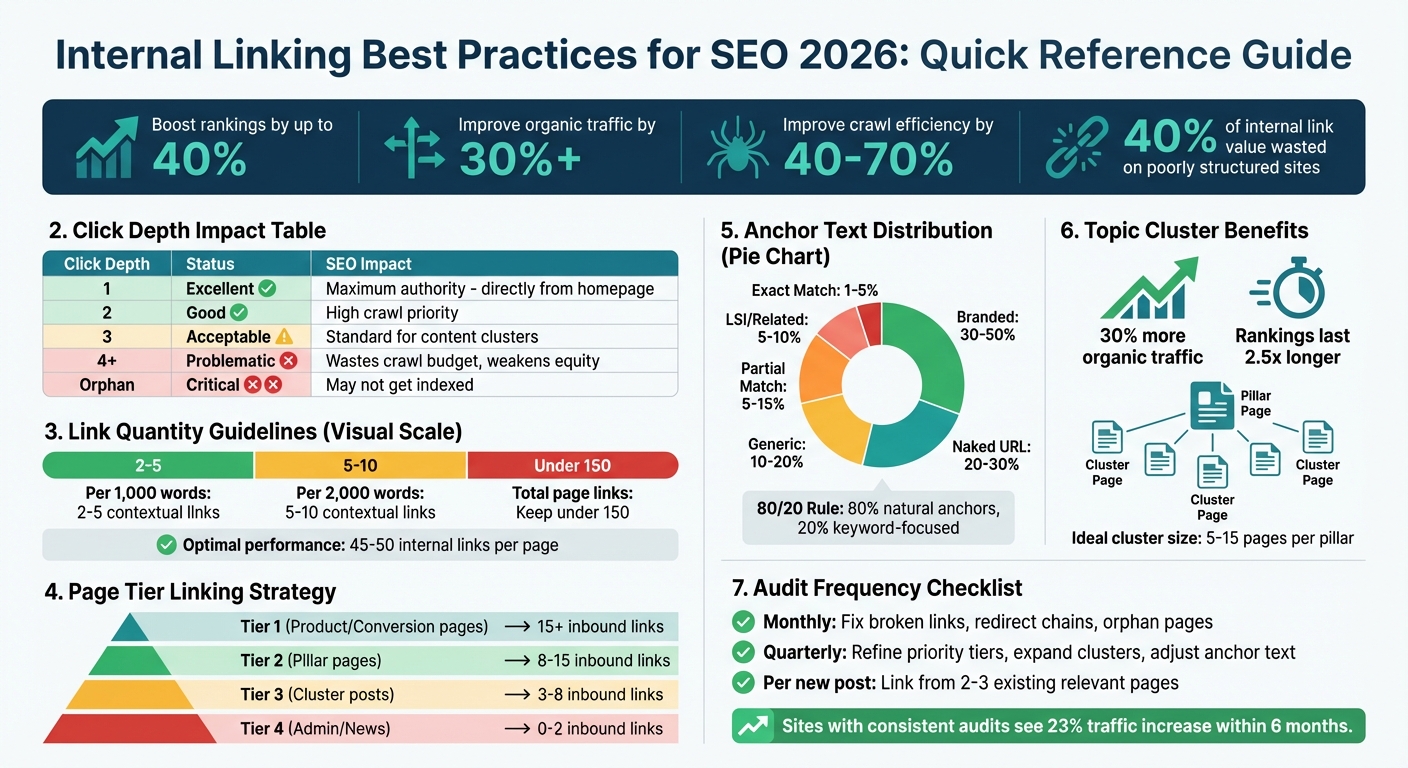
Internal Linking Best Practices: Key Metrics and Guidelines for SEO Success
Internal Linking Strategy For SEO: The Ultimate Guide
sbb-itb-7a4ada9
Core Principles of Internal Linking
Internal linking isn’t just about connecting pages on your site – it’s a critical strategy for improving SEO and guiding users through your content. To make the most of it, focus on three key areas: site structure, link quantity, and user value. Let’s break these down and see how they work together to enhance both search engine visibility and user experience.
Site Architecture and Hierarchy
Think of your site structure as the backbone of your internal linking strategy. A well-organized architecture ensures that authority flows naturally to your most important pages and helps search engines understand your content better. Imagine your site as a pyramid: broad, overarching pillar pages sit at the top, with detailed cluster content branching out below. Ideally, every critical page should be no more than three clicks away from the homepage.
Why does this matter? Pages buried deep in your site often miss out on link equity and struggle to rank. In fact, studies reveal that about 40% of internal link value is wasted on poorly structured websites with orphaned pages.
"In 2026, your structure is not just part of SEO – it is SEO. Algorithms interpret your site more confidently when internal links create deep, cohesive silos of topical content."
- Charwin Vanryck deGroot, BKND Development
Here’s a quick look at how click depth affects SEO:
| Depth | Status | SEO Impact |
|---|---|---|
| 1 | Excellent | Directly linked from the homepage; maximum authority |
| 2 | Good | One click from the homepage; high crawl priority |
| 3 | Acceptable | Two clicks from the homepage; standard for content clusters |
| 4+ | Problematic | Wastes crawl budget; weakens link equity |
| Orphan | Critical | No internal links; may not get indexed |
For navigation, simplicity is key. Research suggests limiting main menu options to 7±2 items to minimize cognitive load.
Link Quantity and Quality Guidelines
The number and placement of links on a page can make or break your internal linking strategy. Aim for 2–5 contextual links per 1,000 words, and increase to 5–10 links for longer content around 2,000 words. These links should flow naturally within your main content, rather than being crammed into sidebars or footers.
Another important guideline: keep your total page links – across navigation, headers, and footers – below 150. Exceeding this number can dilute link equity and even trigger spam signals. Research shows that pages with 45–50 internal links tend to perform best, while traffic drops off when links exceed 50.
Contextual links placed in the body of your content – especially early on – carry more weight than links in less prominent areas like footers or sidebars.
Different types of pages require different linking strategies. Here’s a quick guide:
| Tier | Page Type | Recommended Inbound Links |
|---|---|---|
| Tier 1 | Product, pricing, conversion pages | 15+ |
| Tier 2 | Pillar pages, cornerstone guides | 8–15 |
| Tier 3 | Cluster posts, supporting content | 3–8 |
| Tier 4 | Admin, news, or thin content | 0–2 |
While these numbers are helpful benchmarks, remember that the quality of your links is just as important as the quantity.
User-Focused Linking
At its core, internal linking should prioritize the needs of your audience. Links should guide readers to relevant, valuable content that answers their questions or helps them take the next logical step. This approach not only improves rankings but also increases time on site and reduces bounce rates.
Internal linking is also crucial for Answer Engine Optimization (AEO), as modern AI systems rely on link structures to understand topic relationships. Use descriptive anchor text and logical connections to make these relationships clear.
Avoid linking purely for SEO purposes, like stuffing links into irrelevant contexts or over-optimizing anchor text. Search engines are smart enough to spot and devalue manipulative tactics. Instead, ask yourself: Does this link genuinely help my reader? If the answer is no, leave it out.
"Internal linking is one of the most underutilized yet powerful SEO strategies available to website owners."
- WebD School
Anchor Text Optimization
Anchor text serves as a bridge between search engines and users, helping both understand the content of the linked page. In 2026, the focus is on achieving a balance: anchors should be descriptive yet varied enough to feel natural. Search engines now assess anchor text as part of a broader context, analyzing the surrounding content to grasp the topic better. This means your anchors need to flow seamlessly within your writing.
How to Choose Anchor Text
The best anchor text is descriptive, concise, and relevant, typically sticking to 2–5 words that summarize the linked content. Avoid overusing exact-match keywords. Instead, mix in semantic variations and natural phrases that reflect everyday language.
For internal links, you have more flexibility than with external ones since you control the environment. Keyword-rich anchors can be used, but variety still matters. For example, if you’re linking to a page about keyword research, you might use "keyword research process" in one instance and "how to choose keywords" in another.
"Anchor text is where relevance meets UX. The goal is to help users anticipate what they’ll get after the click while signaling topical context to search engines."
- Eric Siu, Single Grain
A good strategy is aligning your anchor text with the destination page’s H1 or title tag. For example, if the page is titled "Enterprise CRM Integration Guide", your anchor text could be "enterprise CRM integration guide" or a variation like "how to integrate enterprise CRM systems".
Here’s a quick guide to maintaining a natural anchor text profile:
| Anchor Type | Recommended Range | Example |
|---|---|---|
| Branded | 30–50% | "Upward Engine" or your company name |
| Naked URL | 20–30% | "https://upwardengine.com/seo-guide" |
| Generic | 10–20% | "click here" or "read more" |
| Partial Match | 5–15% | "advanced link building strategies for 2026" |
| Exact Match | 1–5% | "link building services" |
| LSI/Related | 5–10% | "backlink acquisition" for a link building page |
A helpful rule of thumb is the 80/20 Rule: keep 80% of your anchors natural and safe, while reserving 20% for keyword-focused variations.
This approach naturally leads to a better understanding of why generic anchor text should be avoided.
Why Generic Anchors Don’t Work
Phrases like "click here", "read more", or "this article" are unhelpful for SEO. They provide no context for search engines and fail to guide users. Ideally, generic anchors should account for no more than 10–20% of your link profile, mimicking typical editorial practices.
Generic anchors also create accessibility challenges. Screen readers rely on anchor text to help visually impaired users navigate a page. If every link says "click here", users won’t know where the link leads.
Instead, aim for intent-rich descriptions that clearly communicate what users can expect. For example:
- Replace "click here to learn more" with "technical SEO audit checklist."
- Swap "read this article" for "how to optimize page speed for Core Web Vitals."
These adjustments not only improve user experience but also help search engines understand your content better.
"If every internal link to a page uses the same phrase, it feels as if you’re only trying to boost that page rather than give a better user experience."
- Laiba Siddiqui, Search Engine Land
The impact is tangible. Websites with well-optimized anchor text often see up to 35% higher click-through rates compared to those using generic phrases.
Beyond selecting the right words, the surrounding content plays a critical role in reinforcing the anchor’s context.
Using Surrounding Content
Anchor text doesn’t work in isolation – it relies on surrounding content for context. A well-placed link within relevant text sends stronger signals than one dropped into unrelated content.
Links embedded within the main body of your content carry more weight than those in navigation menus, sidebars, or footers. Search engines treat these in-body links as editorial endorsements, prioritizing them when distributing authority across your site.
For maximum impact, place important internal links early in your content or above the fold. These links tend to be crawled first, potentially passing more value than those buried deeper on the page. The key is to make the link feel natural – it should align with the sentence that sparks the reader’s curiosity.
If your anchor text feels forced or unnatural, search engines may flag it as manipulative. Always ask yourself: Does this link make sense within the flow of the article?
Optimized anchor text, when paired with thoughtful placement and relevant surrounding content, strengthens your overall internal linking strategy. It not only guides users effectively but also signals relevance to search engines.
Topic Clusters and Internal Linking
Topic clusters take internal linking to the next level by organizing related content in a way that benefits both users and search engines. Instead of focusing on isolated keywords across separate pages, this method creates a structured content system. At the center of it all is a "pillar page" that covers a broad topic, linking to several "cluster pages" that dive deeper into specific subtopics. Picture it like a hub-and-spoke design: the pillar is the hub, and the clusters are the spokes radiating out from it.
This approach does more than just organize your content – it shows search engines that you’re an authority on the subject. When search engines crawl your site, they recognize the interconnected structure, signaling that you’ve thoroughly covered the topic. And the results speak for themselves: content organized into clusters can drive about 30% more organic traffic and hold its rankings 2.5 times longer than standalone articles.
"The future of SEO lies in demonstrating comprehensive knowledge across entire topics, not just individual keywords. Internal linking is the connective tissue that makes this possible." – HubSpot SEO Research Team
Another advantage? Topic clusters help avoid keyword cannibalization. By assigning one primary keyword to each page within a cluster, you ensure your pages aren’t competing with each other for the same search intent. This model aligns perfectly with entity-based SEO, where search engines prioritize understanding the relationships between topics rather than just focusing on keywords.
Pillar Pages and Supporting Content
The pillar page is the cornerstone of your topic cluster. Typically a long-form piece (ranging from 2,500 to 5,000+ words), it provides an overview of the main topic and links to more detailed cluster pages. For instance, a pillar page on "Email Marketing" might introduce the basics and link to cluster pages on topics like "Subject Line Optimization", "Automation Workflows", or "Segmentation Strategies."
Cluster pages, on the other hand, are shorter (usually 1,500 to 2,500 words) and focus on specific subtopics or questions. These pages target long-tail keywords and provide the detailed answers users are searching for. The magic happens when you link them all together: the pillar page links to each cluster, and each cluster links back to the pillar. This creates a network that boosts the authority of the pillar page while making every cluster page easy to find.
For most websites, 5 to 15 cluster pages per pillar is the ideal range. Fewer than five might mean the topic isn’t covered thoroughly enough, while more than 15 could make the structure confusing. On the pillar page, include a brief summary (100 to 200 words) of each subtopic and place the link to the corresponding cluster page near the top of that section. This setup gives users a clear path to follow and helps search engines understand the content relationships.
Land of Rugs, a UK-based ecommerce retailer, saw this strategy pay off. In the first half of 2022, they shifted from focusing solely on product pages to creating topic clusters using a Keyword Insights tool. The result? A 119% increase in blog page views compared to the same period in 2021, along with over $100,000 in revenue.
Linking Between Related Articles
Lateral linking – connecting cluster pages to each other – is just as important as linking to the pillar page. By linking 2 to 3 related cluster pages within each article, you create deeper semantic connections and encourage users to explore related topics. For example, a cluster page on "Email Segmentation" could link to pages on "A/B Testing Email Campaigns" and "Personalization Techniques."
These lateral links not only keep visitors engaged longer but also help search engines see how well your content is interconnected, further reinforcing your topical authority. The key is to add these links naturally within the body text rather than relying solely on sidebars or footers.
| Link Direction | Purpose | SEO/UX Benefit |
|---|---|---|
| Cluster → Pillar | Upward equity flow | Boosts authority for the central pillar page |
| Pillar → Cluster | Topical completeness | Demonstrates expertise across the topic |
| Cluster ↔ Cluster | Lateral navigation | Increases user engagement and builds relationships |
For example, Minuttia demonstrated the power of this strategy by creating a topic cluster that ranked for over 1,100 keywords and generated about 100 organic clicks per weekday. That’s the strength of a well-connected content network.
When you publish a new cluster page, revisit 2 to 3 existing related articles and add links to the new page. This helps the new content gain traction faster and strengthens your overall cluster. Additionally, ensure that all high-priority pillar and cluster pages are no more than three clicks away from your homepage. This not only aids in efficient indexing but also sets the groundwork for smoother link audits and error prevention down the line.
Auditing Your Internal Links
Even the most well-thought-out internal linking strategies need upkeep. As your website grows, some pages get buried, links break, and older strategies lose their edge. Regular audits help ensure your site structure and anchor text stay effective as your content expands. Focus on critical areas during these audits for the best results.
Finding Orphan Pages
Orphan pages are like forgotten corners of your website – content with no inbound internal links. Search engines struggle to discover them, and visitors won’t stumble upon them either. To identify these pages, compare two lists: all your site URLs (from your XML sitemap, Google Search Console, or CMS export) and the URLs found during a site crawl using tools like Screaming Frog.
Once identified, decide how to handle them. Options include removing, redirecting, or reintegrating these pages. Valuable pages can be revived by adding 2 to 5 contextual links from high-authority, relevant pages.
Common causes of orphan pages include outdated campaign landing pages, temporarily unpublished products, or content removed from navigation menus without adjusting the internal link structure. A quick 10-minute workflow can help: export pages with no inbound links, identify high-value ones with potential, and map out 3 to 5 linking opportunities for each.
Finally, confirm that your updated links are driving engagement.
Tracking Performance with Analytics
Data is your best friend when evaluating your internal linking efforts. Use Google Analytics to monitor metrics like pages per session and average session duration – improvements here indicate your internal links are working. If users are exploring more pages and spending more time on your site, your links are doing their job.
Google Search Console is another essential tool. Its "Links" report under the Internal section shows which pages have the most internal links and which are underlinked. Pages with high impressions but low click-through rates might need better links from authoritative pages to improve visibility.
Heatmaps (like those from Hotjar) can also reveal whether users are clicking on your internal links. Additionally, tools like Screaming Frog or Sitebulb can map your site structure, identify broken links (404 errors), and flag redirect chains that waste crawl budget. For optimal results:
- High-priority pages should have 15+ internal links.
- Pillar pages should aim for 8 to 15 links.
- Standard cluster posts should include 3 to 8 links.
| Metric Category | Specific Metric | Tool(s) |
|---|---|---|
| Technical | Crawl Depth (Clicks from Home) | Screaming Frog, Sitebulb, GSC |
| Technical | Inlinks/Outlinks Count | Screaming Frog, Ahrefs, SEMrush |
| Authority | Internal PageRank/Link Equity | Screaming Frog, Sitebulb |
| User Behavior | Pages per Session / Dwell Time | Google Analytics |
| Visibility | Impressions and Clicks | Google Search Console |
Regularly monitor these metrics and adjust your internal linking strategy to reflect new trends.
Updating Links as Content Grows
Internal linking isn’t a "set it and forget it" task. As new content is published, older pages may get buried, making them harder to find. To prevent this, link to new posts from relevant existing pages to ensure they aren’t orphaned and are indexed quickly.
Conduct monthly audits to fix broken links, address redirect chains, and identify new orphan pages. Every quarter, take a broader look at your site’s structure: refine priority tiers, expand topic clusters, and adjust anchor text as needed. This helps combat "link decay", where site architecture naturally deteriorates over time.
"The tactical approach works fine at 20 posts. By 100 posts, it breaks down. By 200 posts, your archive is a random web of links with no clear authority flow." – Linkbot
For sites with 50 to 100+ pages, manually maintaining internal links becomes impractical. Automation tools can identify missed opportunities in older content. Additionally, leverage your "backlink magnets" (pages with the most external backlinks) to link to new, high-priority content, distributing their earned authority. According to an SEO expert, sites that consistently audit their internal links see an average 23% increase in organic traffic within six months.
Keeping up with these processes ensures your internal linking strategy evolves alongside your site, strengthening your SEO over time.
Common Internal Linking Mistakes
Even seasoned site owners sometimes slip up with internal linking, which can hurt their SEO efforts. Spotting and fixing these mistakes is key to keeping your site structure strong and improving search rankings.
Over-Optimizing Anchor Text
Using the same exact-match anchor text repeatedly can come across as spammy to search engines. For instance, if you always link to your "best running shoes" page using the exact phrase "best running shoes", Google’s algorithms might flag it as excessive repetition. This could lead to ranking penalties or even broader issues for your domain.
To avoid this, mix it up. Use a variety of anchor text types – aim for a balance like 40% partial-match, 40% semantic, and 20% exact-match. Also, prioritize placing your most important links in the main body of your content rather than in headers or footers, as links in the top 30% of your content tend to carry more weight. Make sure your anchor text fits naturally within sentences and doesn’t disrupt readability.
But anchor text isn’t the only thing to watch out for – overloading pages with too many links is another common issue.
Too Many Links Per Page
Even if your anchor text is on point, cramming a page with too many links can backfire. When a page is overloaded with links, the authority passed to each destination is diluted. This can also muddle your site’s structure, making it harder for users and search engines to identify the most important pages.
John Mueller from Google explains:
"…if you do dilute the value of your site structure by having so many internal links that the site’s structure becomes unclear, then that does make it harder for us to understand what you think is important on your website".
Research backs this up – pages with 5 to 10 well-placed internal links tend to perform about 25% better than those with fewer connections. Focus on linking only when it genuinely benefits the reader and supports the content.
Linking to Unrelated Pages
Relevance is critical when it comes to internal linking. Adding links to pages that don’t relate to the current content can confuse both users and search engines. For example, linking a page about coffee brewing tips to one about lawn care advice doesn’t make sense and might frustrate users, leading them to leave your site.
Search engines also rely on internal links to understand how your content is connected. Linking to unrelated pages can make it harder for Google to recognize your expertise in specific topics. For example, a Semrush case study from August 2025 highlighted how a marketplace software startup with a well-organized, contextually relevant internal linking strategy outperformed a competitor using unrelated links. Despite similar authority scores, the startup achieved over four times the monthly organic traffic.
To keep your links relevant, only add them when they serve a clear purpose – like answering the reader’s next likely question or expanding on a subtopic. A pillar-cluster model can help by connecting related articles within the same subject area, reinforcing your site’s topical focus. This approach ensures your internal linking network stays coherent and supports your authority in key areas.
Conclusion
Internal linking serves as the backbone for how both search engines and users navigate your website. By establishing a clear site architecture with well-defined topic clusters – like those we discussed regarding site hierarchy – you create a structure that strategically distributes authority while guiding users and search engines efficiently. Optimizing anchor text with natural variations and conducting regular audits for broken or orphaned pages ensures this system remains effective.
The impact of internal linking is backed by numbers: it can boost search rankings by up to 40%, improve crawl efficiency by 40% to 70%, and drive traffic increases of 31% or more in just a few months. These results come from transferring PageRank from high-authority pages to critical conversion pages, demonstrating the tangible benefits of a well-planned internal linking strategy.
"Treat internal linking like infrastructure. It determines how search engine bots and real people move through your site".
Looking ahead to 2026, as AI-driven search engines and answer engines increasingly rely on clear topical relationships, internal linking will play an even bigger role in establishing authority and boosting discoverability across platforms.
To put this into action, remember to keep essential pages within three clicks of your homepage. Perform quarterly audits to identify broken links and orphaned content. When publishing new content, link it from 2–3 relevant older pages to pass authority and speed up indexation. These small but consistent steps will compound over time, enhancing both your search engine performance and user experience.
Start with targeted changes – whether it’s addressing orphaned pages or refining your pillar-cluster model. Each improvement strengthens your site’s foundation, paving the way for sustainable growth over the long term.
FAQs
How do I choose which pages should get the most internal links?
When building your internal linking strategy, give priority to your most important pages – those that align with your SEO goals. These might include pillar pages or content targeting high-value keywords. Conduct a site audit to identify orphaned pages (those without internal links) or low-visibility pages. Adding internal links to these pages can boost their authority and make them easier for search engines to crawl.
Focus on linking to pages that are central to your topic clusters or serve as in-depth resources. This approach not only strengthens their ranking potential but also enhances their overall importance within your site’s structure.
What’s the best way to build topic clusters on an existing site?
To create effective topic clusters in 2026, focus on a well-planned internal linking framework. Begin with a pillar page that addresses a broad topic comprehensively. Then, develop cluster pages that dive into specific subtopics related to the main theme. Use relevant anchor text to interlink these pages, emphasizing their relationship. Make it a habit to audit your links regularly to repair broken ones and ensure link equity is distributed effectively. This method not only simplifies navigation but also strengthens topical authority and improves SEO outcomes.
Which tools should I use to find orphan pages and broken internal links?
To locate orphan pages and broken internal links, you can rely on tools like Link Whisper, which specializes in internal link audits, and SEO PowerSuite, designed for crawling and monitoring your site. For larger websites, Linkbot offers automation to streamline the process. These tools help maintain a solid internal link structure, boosting your site’s crawlability and overall SEO performance. Another helpful option is Sight AI, which provides detailed analysis to ensure no page is left behind.